Table of Contents
- How Headless CMS Architecture Is Changing Modern Website Development
- What Is a Headless CMS?
- Traditional CMS vs. Headless CMS
- Traditional CMS
- Headless CMS
- Why Businesses Are Moving Toward Headless CMS
- 1. Omnichannel Content Delivery
- 2. Greater Front-End Flexibility
- 3. Improved Website Performance
- 4. Better Developer Experience
- 5. Content Reusability
- 6. Easier Omnichannel Marketing
- 7. Better Scalability
- 8. Stronger Integration Capabilities
- 9. Improved Personalization Opportunities
- 10. Better Security Separation
- Headless CMS and Modern JavaScript Frameworks
- Headless CMS for E-Commerce
- Headless CMS and SEO
- Challenges of Headless CMS Architecture
- 1. Greater Development Complexity
- 2. More Systems to Manage
- 3. Higher Initial Development Effort
- 4. Content Preview Challenges
- 5. Dependency on APIs
- When Should a Business Consider a Headless CMS?
- Best Practices for Headless CMS Development
- Define Content Models Carefully
- Design APIs Efficiently
- Implement Caching
- Plan for Failure
- Maintain Strong Security
- Build a Good Content Preview Experience
- Monitor Performance
- The Future of Headless CMS
- Final Thoughts
How Headless CMS Architecture Is Changing Modern Website Development
Modern websites are no longer limited to a single webpage displayed in a browser. Businesses now need to deliver content across websites, mobile applications, e-commerce platforms, digital displays, smart devices, and other digital channels.
Traditional content management systems were primarily designed around a specific website presentation layer. While this approach remains useful, businesses with complex digital requirements are increasingly exploring a different architecture: the headless CMS.
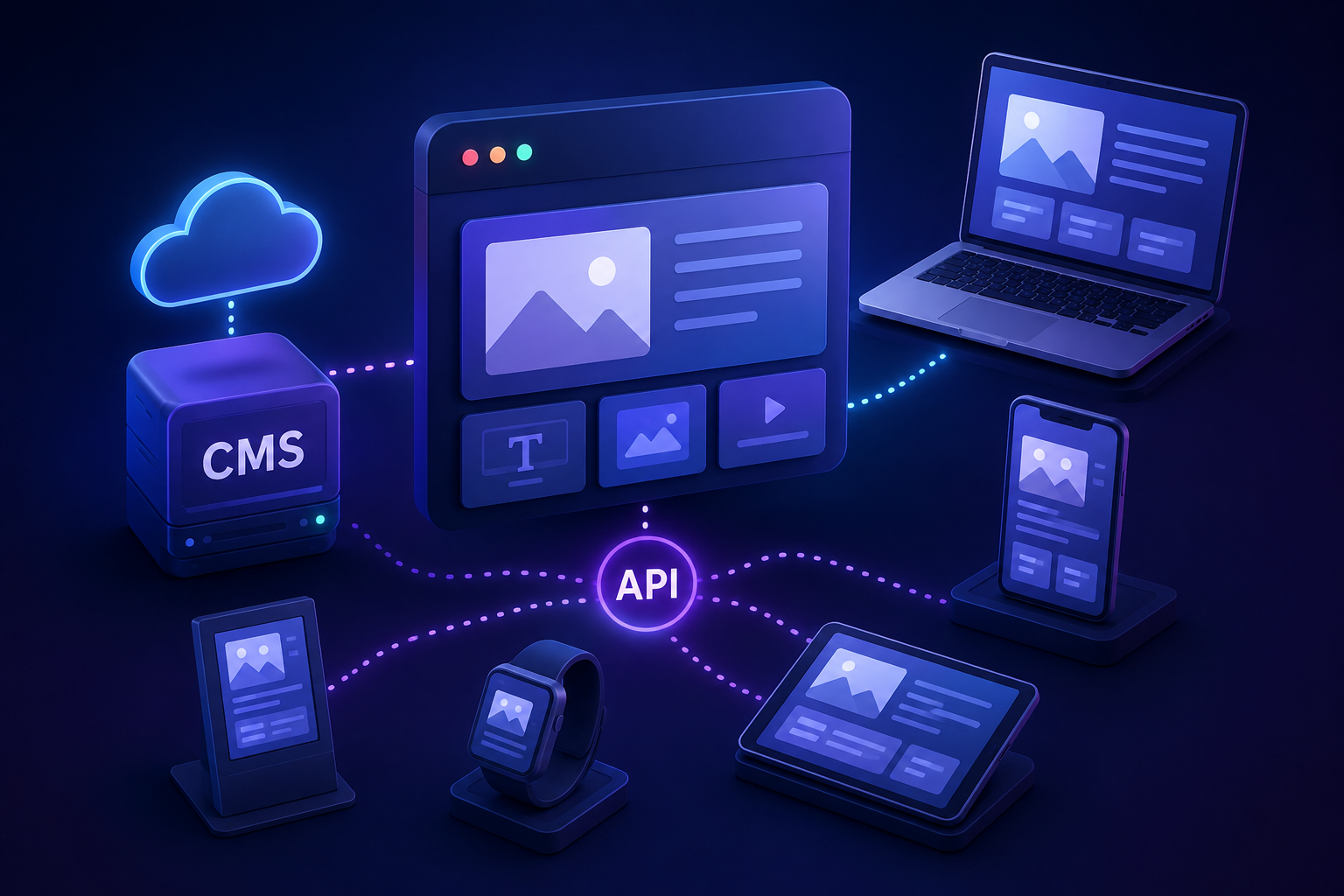
A headless CMS separates content management from content presentation. This allows developers to manage content in one centralized system while delivering it to different platforms through APIs.
As businesses focus on flexibility, personalization, performance, and omnichannel experiences, headless CMS architecture is becoming an important approach to modern website development.
What Is a Headless CMS?
A headless CMS is a content management system where the content management layer is separated from the front-end presentation layer.
In a traditional CMS, content creation and website presentation are closely connected.
A simplified traditional architecture looks like:
Content → CMS → Website Theme → User
A headless architecture separates these responsibilities:
Content → Headless CMS → API → Website / App / Other Platforms
The CMS manages and stores content, while developers decide how and where that content should be displayed.
This separation is what gives a headless CMS its flexibility.
Traditional CMS vs. Headless CMS
A traditional CMS generally combines:
- Content management
- Templates
- Themes
- Website rendering
- Plugins
- Presentation logic
A headless CMS focuses primarily on content management and delivery through APIs.
Traditional CMS
Admin
↓
CMS
↓
Theme / Templates
↓
Website
Headless CMS
Content Editors
↓
Headless CMS
↓
API
↙ ↓ ↘
Web Mobile Other Platforms
Both approaches have advantages, but headless architecture can provide greater flexibility when businesses need to publish content across multiple channels.
Why Businesses Are Moving Toward Headless CMS
The digital landscape has changed significantly.
Businesses may now operate:
- Corporate websites
- E-commerce stores
- Mobile applications
- Customer portals
- Digital kiosks
- Marketing landing pages
- Internal platforms
Managing content separately for every platform can create duplication and maintenance problems.
A headless CMS allows businesses to maintain content centrally and deliver it to different front-end experiences.
For example, a product description could be stored once and delivered to:
- A website
- A mobile application
- A tablet application
- An e-commerce interface
This creates a more centralized content strategy.
1. Omnichannel Content Delivery
One of the biggest advantages of headless CMS architecture is the ability to deliver content across multiple channels.
Instead of creating separate content systems for each platform, organizations can use one centralized content repository.
For example:
One Product Description → API → Website + Mobile App + Digital Display
This can make content management more efficient and consistent.
2. Greater Front-End Flexibility
Traditional CMS platforms often tie websites closely to their themes and templates.
With a headless CMS, developers can choose the front-end technology that best fits the project.
Teams can use technologies such as:
- React
- Vue
- Angular
- Next.js
- Nuxt
- Svelte
- Other modern frameworks
The CMS does not necessarily determine how the front end must be built.
This gives development teams greater freedom to create customized user experiences.
3. Improved Website Performance
Headless architecture can support modern development approaches that prioritize performance.
For example, developers may use:
- Static site generation
- Server-side rendering
- Incremental static regeneration
- Content delivery networks
- Edge delivery
- Optimized APIs
These approaches can help deliver content efficiently.
However, a headless CMS does not automatically make a website faster. Performance still depends on how the application is designed, how APIs are used, how content is cached, and how the front end is implemented.
4. Better Developer Experience
Developers can work with familiar front-end technologies rather than being restricted by a CMS's built-in templating system.
This can simplify the development of highly customized interfaces.
For example, a development team may build a modern React-based website while content editors continue managing content through a dedicated CMS.
The two systems communicate through APIs.
This separation allows developers and content teams to work more independently.
5. Content Reusability
Headless CMS platforms encourage content to be treated as structured data.
Instead of creating content only for a specific webpage, businesses can create reusable content components.
For example:
Article
- Title
- Author
- Summary
- Featured Image
- Content
- Category
- Tags
This content can then be displayed differently across various platforms.
A single article might appear as a full article on a website, a shortened card in a mobile application, or a recommendation in another digital experience.
6. Easier Omnichannel Marketing
Marketing teams increasingly need to publish content across multiple channels.
A centralized content system can simplify this process.
For example, a promotional campaign could include:
- Website banner
- Mobile app notification
- Product page content
- Landing page
- Promotional display
Instead of managing completely separate content repositories, teams can reuse structured content where appropriate.
7. Better Scalability
As businesses grow, their digital platforms often become more complex.
A traditional CMS may eventually become difficult to customize when it is responsible for content management, rendering, plugins, integrations, and other functionality.
A headless approach separates these responsibilities.
The CMS manages content while the front-end application handles presentation.
This separation can make it easier to scale individual parts of the architecture.
8. Stronger Integration Capabilities
Modern businesses rely on many different systems.
A website may need to connect with:
- CRM platforms
- E-commerce systems
- Payment gateways
- Marketing automation tools
- Search services
- Analytics platforms
- Customer support software
- Product databases
Because headless CMS platforms typically expose content through APIs, they can integrate with other systems more flexibly.
For example:
CMS → API → E-commerce Application → Product Experience
This allows content and business data to work together within a modern application architecture.
9. Improved Personalization Opportunities
A headless architecture can provide flexibility for creating personalized experiences.
A business could use customer information, behavior, or other business rules to determine which content should be displayed.
For example:
Customer Segment → Personalization Logic → Relevant Content
The CMS stores the content, while the application determines how and when it should be presented.
This separation can make sophisticated personalization strategies easier to implement.
10. Better Security Separation
Separating the content management environment from the public-facing website can provide architectural security benefits.
For example, the content management interface does not necessarily need to be directly responsible for rendering the public website.
The front end can retrieve only the required content through controlled APIs.
However, headless architecture does not automatically guarantee better security. Businesses still need appropriate:
- Authentication
- Authorization
- API security
- Rate limiting
- Input validation
- Access controls
- Monitoring
- Data protection
Security must be designed across the entire system.
Headless CMS and Modern JavaScript Frameworks
Headless CMS architecture works particularly well with modern JavaScript frameworks.
For example:
Headless CMS
↓
API
↓
Next.js
↓
Website
The CMS handles content while the front-end framework handles the user interface and application behavior.
This approach can support modern features such as:
- Dynamic routing
- Server-side rendering
- Static generation
- Responsive interfaces
- Interactive components
- Personalized experiences
Headless CMS for E-Commerce
E-commerce businesses can particularly benefit from headless architecture.
An online store may need to combine:
- Product information
- Pricing
- Promotions
- Customer accounts
- Shopping carts
- Payments
- Marketing content
A headless approach allows the content layer and shopping experience to evolve independently.
For example:
CMS → Marketing Content
E-commerce Platform → Product & Transaction Data
Front End → Unified Customer Experience
This can give businesses more freedom to create unique shopping experiences.
Headless CMS and SEO
SEO is an important consideration for modern websites.
A headless architecture can support SEO-friendly implementations, but developers need to build the required functionality correctly.
Important elements include:
- Page titles
- Meta descriptions
- Structured data
- Canonical URLs
- Search-friendly URLs
- Sitemap generation
- Internal linking
- Proper headings
- Image optimization
- Fast page delivery
A headless CMS can store SEO-related fields, while the front-end application uses those fields to generate appropriate HTML metadata.
Challenges of Headless CMS Architecture
While headless CMS architecture offers many advantages, it is not the right solution for every project.
1. Greater Development Complexity
Traditional CMS platforms may provide themes, plugins, and built-in page rendering.
With a headless system, developers often need to build more of the front-end architecture themselves.
This can require greater technical expertise.
2. More Systems to Manage
A headless application may include:
- CMS
- Front-end application
- API layer
- Hosting platform
- CDN
- Search system
- Authentication system
Managing multiple services can increase operational complexity.
3. Higher Initial Development Effort
Creating a custom front end from scratch may take more time than using a traditional CMS theme.
Businesses should consider whether the additional flexibility justifies the investment.
4. Content Preview Challenges
Content editors often want to see exactly how content will appear before publishing.
Previewing content in a decoupled architecture may require additional development.
5. Dependency on APIs
If the front end depends heavily on CMS APIs, API failures or latency can affect the user experience.
Caching and error-handling strategies should therefore be carefully designed.
When Should a Business Consider a Headless CMS?
A headless CMS may be appropriate when a business needs:
- Multiple digital channels
- A highly customized front end
- Modern web application frameworks
- Reusable structured content
- Omnichannel publishing
- Complex integrations
- Independent front-end development
- Large-scale digital experiences
A traditional CMS may still be a better choice for smaller websites that primarily need:
- Simple content publishing
- Basic blogs
- Company information
- Standard templates
- Minimal development resources
The right architecture depends on business requirements, technical capabilities, budget, and long-term goals.
Best Practices for Headless CMS Development
Define Content Models Carefully
Create structured content models that are reusable across different experiences.
Design APIs Efficiently
Only request the content required by the application to avoid unnecessary network traffic.
Implement Caching
Caching can improve performance and reduce repeated requests to the CMS.
Plan for Failure
Applications should gracefully handle CMS or API failures.
Maintain Strong Security
Protect APIs and administrative interfaces with appropriate authentication and authorization.
Build a Good Content Preview Experience
Content editors should be able to preview how their work will appear before publishing.
Monitor Performance
Track API response times, page performance, errors, and content delivery.
The Future of Headless CMS
The future of website development is increasingly focused on flexible, connected digital experiences.
Businesses are no longer building websites in isolation. Websites often form one part of a larger digital ecosystem that includes applications, e-commerce platforms, customer portals, and other services.
Headless architecture fits naturally into this environment because content can be treated as reusable data rather than being permanently tied to a single presentation layer.
As businesses adopt AI-powered applications, personalization, composable architecture, and multi-channel experiences, structured content and flexible APIs are likely to become even more important.
Final Thoughts
Headless CMS architecture is changing modern website development by separating content management from content presentation.
This approach gives businesses greater flexibility to deliver content across websites, applications, e-commerce platforms, and other digital channels.
It can support:
- Reusable content
- Modern front-end technologies
- Omnichannel experiences
- Flexible integrations
- Scalable architectures
- Customized user experiences
However, headless CMS is not automatically better than a traditional CMS. It introduces additional development and operational complexity and should be adopted when its flexibility provides meaningful business value.
For organizations building complex, scalable, and multi-channel digital experiences, a headless CMS can provide a strong foundation for the future of modern web development.