Table of Contents
- How Role-Based Access Control Improves Enterprise Software Management
- Introduction
- What Is Role-Based Access Control?
- Why RBAC Matters for Enterprise Software
- 1. Improves Data Security
- 2. Simplifies User Permission Management
- 3. Makes Employee Onboarding Faster
- 4. Makes Employee Offboarding Easier
- 5. Supports the Principle of Least Privilege
- 6. Protects Sensitive Business Information
- 7. Reduces Accidental Changes
- 8. Supports Better Separation of Responsibilities
- 9. Improves Enterprise Application Management
- 10. Supports Different Levels of Access
- 11. Helps Manage Multi-Department Organizations
- 12. Supports Scalability
- 13. Improves Audit and Monitoring
- 14. Supports Compliance Requirements
- 15. Improves Employee Productivity
- Common RBAC Components
- Users
- Roles
- Permissions
- Resources
- Example of RBAC in an ERP Application
- Administrator
- Sales Manager
- Sales Employee
- Accountant
- Inventory Manager
- Best Practices for Implementing RBAC
- 1. Define Roles Based on Real Responsibilities
- 2. Follow Least Privilege
- 3. Avoid Creating Too Many Roles
- 4. Review Permissions Regularly
- 5. Use Strong Administrative Controls
- 6. Maintain Audit Logs
- 7. Plan for Temporary Access
- 8. Test Access Rules
- Common RBAC Mistakes
- Giving Everyone Administrator Access
- Creating Overly Broad Roles
- Not Updating Roles
- Ignoring Sensitive Actions
- Forgetting API Permissions
- RBAC and Modern Enterprise Applications
- Conclusion
How Role-Based Access Control Improves Enterprise Software Management
Introduction
Modern businesses rely on software applications to manage customers, employees, finances, inventory, documents, projects, and other critical operations. As organizations grow, controlling who can access specific information and features becomes increasingly important.
Giving every employee the same level of access can create unnecessary security risks. At the same time, restricting users too much can make everyday work difficult.
Role-Based Access Control (RBAC) provides a structured approach to managing application permissions. Instead of assigning permissions individually to every user, organizations create roles based on job responsibilities and assign appropriate permissions to each role.
For enterprise software, RBAC can improve security, simplify user management, support compliance, and make applications easier to manage as the organization grows.
What Is Role-Based Access Control?
Role-Based Access Control is a permission management model where access is assigned according to a user's role within an organization.
For example, an enterprise application might have:
- Administrator
- Manager
- Sales Employee
- Accountant
- HR Employee
- Inventory Manager
- Support Agent
- Regular Employee
Each role receives permissions appropriate to its responsibilities.
For example:
Administrator
- Manage users
- Configure system settings
- View all modules
- Manage permissions
Sales Employee
- View customers
- Create quotations
- Create orders
- Update assigned leads
Accountant
- Manage invoices
- Record payments
- View financial reports
Inventory Manager
- Manage products
- Update stock
- Process stock adjustments
- View inventory reports
This approach prevents users from accessing functions that are unrelated to their responsibilities.
Why RBAC Matters for Enterprise Software
Enterprise applications often contain sensitive information and powerful features. A single system may contain:
- Customer information
- Employee records
- Financial data
- Sales information
- Inventory records
- Business reports
- Internal documents
- Administrative settings
Without an effective permission structure, users may accidentally or intentionally access information they do not need.
RBAC creates a clear relationship between users, responsibilities, and system permissions.
1. Improves Data Security
One of the primary benefits of RBAC is improved control over sensitive information.
For example, employees in the sales department may need customer and order information but may not need access to payroll or financial administration.
RBAC allows organizations to restrict access according to business responsibilities.
This follows the principle of giving users only the permissions required to perform their jobs.
2. Simplifies User Permission Management
Managing permissions individually can become difficult when an organization has hundreds or thousands of employees.
Without roles, an administrator might need to configure permissions separately for every user.
With RBAC:
Role → Permissions → Users
For example:
Accountant Role
- View invoices
- Create invoices
- Record payments
- View financial reports
When a new accountant joins the organization, the administrator can assign the Accountant role instead of configuring every permission manually.
This saves time and reduces configuration errors.
3. Makes Employee Onboarding Faster
New employees often need access to several systems and modules.
With role-based permissions, onboarding becomes more structured.
For example:
New Sales Employee → Sales Role → Required Permissions
The employee can receive the appropriate access without an administrator manually configuring every feature.
This can make the onboarding process faster and more consistent.
4. Makes Employee Offboarding Easier
When an employee leaves a company, their system access should be removed quickly.
With RBAC, administrators can disable the user's account or remove their assigned role.
This is generally easier to manage than reviewing dozens of individual permissions.
Effective offboarding helps reduce the risk of former employees retaining access to company systems.
5. Supports the Principle of Least Privilege
The principle of least privilege means users should receive only the access they need to perform their responsibilities.
For example, a customer support employee may need to:
- View customer information
- Create support tickets
- Update ticket status
But they may not need to:
- Delete customer records
- Change system settings
- Access payroll information
- Modify financial transactions
RBAC makes it easier to implement this principle throughout enterprise applications.
6. Protects Sensitive Business Information
Different departments often handle different types of sensitive data.
For example:
HR
- Employee records
- Leave information
- Salary-related data
Finance
- Payments
- Invoices
- Financial reports
Sales
- Leads
- Customers
- Orders
Management
- Business reports
- Performance information
- Strategic data
RBAC can help ensure that sensitive information is accessible only to authorized users.
7. Reduces Accidental Changes
Not every user should have permission to modify important records.
For example, an employee may be allowed to view inventory but not adjust stock quantities.
Similarly, a sales employee may create an order but may not be allowed to delete completed transactions.
Restricting sensitive actions can reduce the risk of accidental changes.
8. Supports Better Separation of Responsibilities
Enterprise applications often require different people to perform different stages of a process.
For example:
Employee Creates Purchase Request → Manager Approves → Finance Verifies → Procurement Places Order
RBAC can ensure that users only perform the actions associated with their responsibilities.
This creates a clearer separation of duties and can improve internal controls.
9. Improves Enterprise Application Management
Large software systems may contain dozens of modules.
For example:
- Dashboard
- CRM
- Sales
- Purchasing
- Inventory
- HR
- Finance
- Reports
- Settings
Managing access to each module individually for every employee can become difficult.
Roles provide a centralized way to organize permissions.
Administrators can define:
Role → Module Access → Actions
For example:
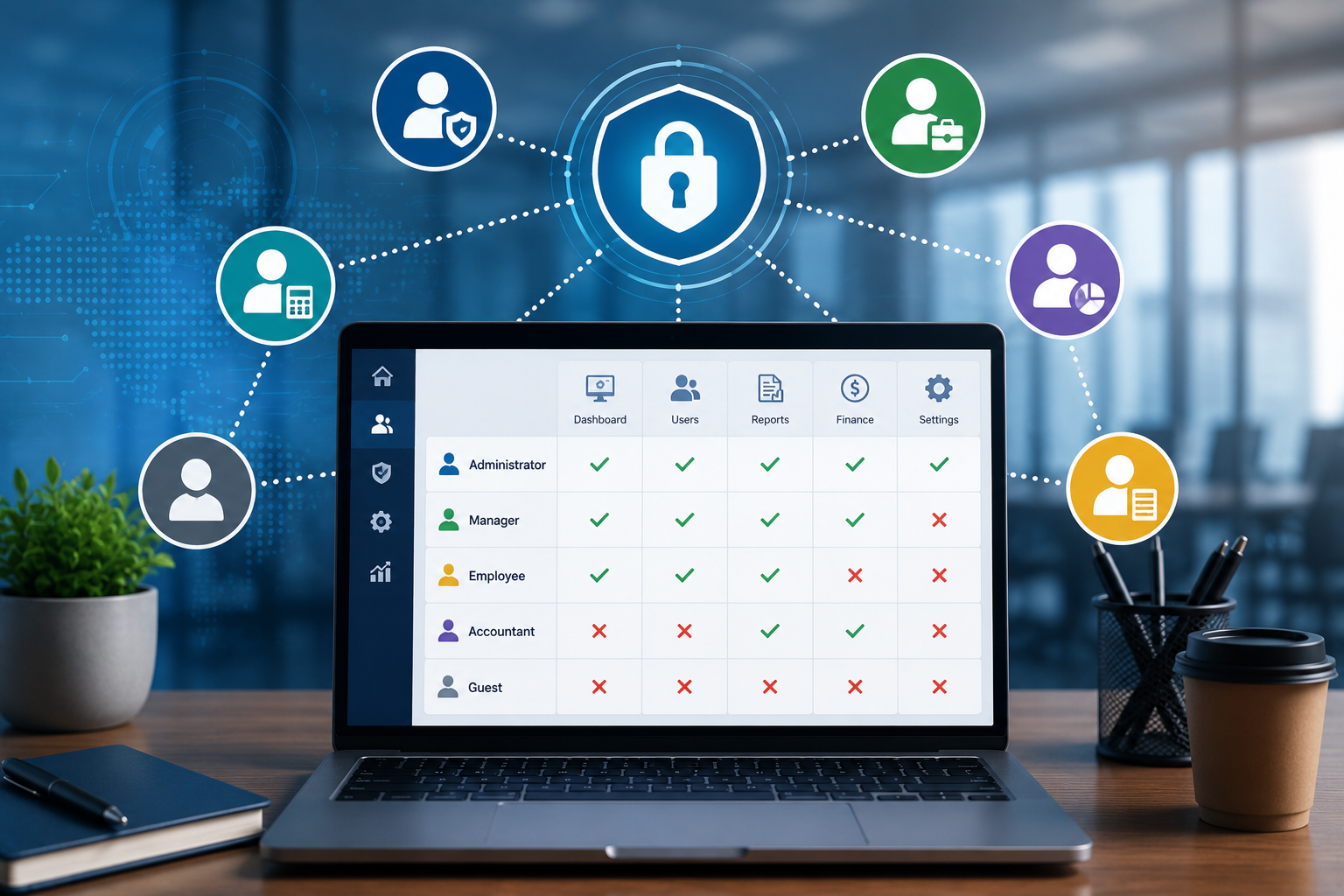
| Role | View | Create | Edit | Delete | Approve |
|---|---|---|---|---|---|
| Admin | ✓ | ✓ | ✓ | ✓ | ✓ |
| Manager | ✓ | ✓ | ✓ | Limited | ✓ |
| Employee | ✓ | ✓ | ✓ | No | No |
| Viewer | ✓ | No | No | No | No |
This makes permission management easier to understand.
10. Supports Different Levels of Access
RBAC does not have to be limited to simply allowing or denying access to a module.
Permissions can be divided into actions such as:
- View
- Create
- Edit
- Delete
- Approve
- Export
- Download
- Assign
- Configure
For example, an employee might be allowed to view and create customer records but not delete them.
This provides more precise control.
11. Helps Manage Multi-Department Organizations
Large organizations may have employees working across different departments, locations, and teams.
A role-based system can define permissions for different organizational responsibilities.
For example:
Regional Manager
- View regional sales
- Manage regional employees
- Approve regional requests
Sales Representative
- View assigned customers
- Create quotations
- Manage assigned leads
This can help organizations maintain appropriate access as their structure becomes more complex.
12. Supports Scalability
As a company grows, its software permission requirements also become more complicated.
An organization might grow from:
20 Employees → 100 Employees → 500 Employees → 5,000 Employees
Managing individual permissions at each stage becomes increasingly difficult.
RBAC provides a reusable permission structure that can scale with the organization.
New users can be assigned existing roles, while new roles can be created when business responsibilities change.
13. Improves Audit and Monitoring
Enterprise applications often need to track who performed important actions.
For example:
- Who approved an invoice?
- Who changed a product price?
- Who modified a customer record?
- Who exported a report?
- Who changed user permissions?
RBAC can work alongside audit logging to provide greater visibility into user activities.
This can help organizations investigate unusual activity and maintain accountability.
14. Supports Compliance Requirements
Many businesses need to demonstrate that sensitive information and critical operations are properly controlled.
RBAC can help organizations establish structured access policies.
For example, organizations may define rules such as:
- Only authorized finance employees can access financial records.
- Only HR personnel can access sensitive employee information.
- Only administrators can change system permissions.
- Approval actions are limited to authorized managers.
The exact compliance requirements vary by industry and jurisdiction, but structured access control can support stronger governance.
15. Improves Employee Productivity
Security should not make software unnecessarily difficult to use.
RBAC can help users see only the features relevant to their jobs.
For example, a warehouse employee may see:
- Inventory
- Products
- Stock Transfers
- Purchase Orders
They may not need to see:
- Payroll
- Marketing
- Financial Configuration
- System Administration
A focused interface can reduce confusion and help employees find the tools they need faster.
Common RBAC Components
A typical RBAC implementation contains several important elements.
Users
These are individuals who access the application.
Roles
Roles represent job responsibilities.
Examples:
- Administrator
- Manager
- Accountant
- Sales Employee
Permissions
Permissions define what actions a role can perform.
Examples:
- View Customer
- Create Order
- Edit Product
- Delete Record
- Approve Invoice
Resources
Resources are the objects or modules being protected.
Examples:
- Customer
- Product
- Invoice
- Employee
- Order
A simple structure can be represented as:
User → Role → Permission → Resource
Example of RBAC in an ERP Application
Consider an ERP application used by a growing business.
Administrator
Access:
- All modules
- User management
- Role management
- System settings
Sales Manager
Access:
- Customers
- Leads
- Quotations
- Orders
- Sales reports
Additional permissions:
- Approve discounts
- Review team performance
Sales Employee
Access:
- Assigned leads
- Customers
- Quotations
- Orders
Restrictions:
- Cannot modify system settings
- Cannot access payroll
- Cannot delete completed orders
Accountant
Access:
- Invoices
- Payments
- Financial reports
Restrictions:
- Cannot manage employee records
- Cannot modify inventory settings
Inventory Manager
Access:
- Products
- Stock
- Suppliers
- Purchase orders
- Inventory reports
This structure creates a clear separation between different business responsibilities.
Best Practices for Implementing RBAC
1. Define Roles Based on Real Responsibilities
Roles should reflect actual job functions rather than arbitrary user groups.
2. Follow Least Privilege
Give users only the permissions necessary for their responsibilities.
3. Avoid Creating Too Many Roles
Creating a separate role for every individual user can make the system difficult to manage.
Roles should be meaningful and reusable.
4. Review Permissions Regularly
Employee responsibilities can change, so permissions should be reviewed periodically.
5. Use Strong Administrative Controls
Only authorized administrators should be able to create roles or modify sensitive permissions.
6. Maintain Audit Logs
Important permission changes and sensitive actions should be recorded where appropriate.
7. Plan for Temporary Access
Some employees may need temporary access to specific resources. The system should have a controlled way to manage these situations.
8. Test Access Rules
Before deploying permission changes, test different user roles to ensure users can access what they need and cannot access restricted functions.
Common RBAC Mistakes
Giving Everyone Administrator Access
This removes the purpose of role-based security and increases risk.
Creating Overly Broad Roles
A role with access to every module may provide more access than employees actually need.
Not Updating Roles
When employees change departments or responsibilities, their permissions should be reviewed.
Ignoring Sensitive Actions
View permissions are not the only concern. Actions such as deleting, exporting, approving, and changing configurations should also be controlled.
Forgetting API Permissions
Access control should apply not only to web pages but also to APIs and other application interfaces.
RBAC and Modern Enterprise Applications
Modern applications often use RBAC together with other security mechanisms.
These may include:
- Authentication
- Multi-factor authentication
- Session management
- Audit logging
- Encryption
- API authorization
- Device controls
- Security monitoring
RBAC focuses specifically on who can perform which actions, making it an important component of a broader enterprise security strategy.
Conclusion
Role-Based Access Control provides businesses with a structured way to manage permissions across enterprise software.
By connecting users with roles and roles with specific permissions, organizations can improve security, simplify administration, support least-privilege access, reduce accidental changes, and make employee onboarding and offboarding easier.
For growing businesses, RBAC is more than a security feature. It is a practical method for organizing how employees interact with software.
When roles and permissions are carefully designed around real business responsibilities, enterprise applications become easier to manage, more secure, and better aligned with organizational workflows.