Table of Contents
- Understanding Webhooks: How Real-Time Business Systems Communicate
- What Is a Webhook?
- How Do Webhooks Work?
- Webhooks vs. APIs
- API Communication
- Webhook Communication
- Common Business Uses of Webhooks
- 1. Payment Notifications
- 2. E-Commerce
- 3. CRM Integration
- 4. Marketing Automation
- 5. Communication and Notifications
- Benefits of Using Webhooks
- Real-Time Communication
- Reduced API Polling
- Better Resource Efficiency
- Automation
- Improved Business Processes
- Important Webhook Security Practices
- Verify Webhook Signatures
- Use HTTPS
- Validate Incoming Data
- Prevent Replay Attacks
- Keep Secrets Secure
- Handling Failed Webhooks
- Idempotency Is Important
- Webhooks in Modern Business Applications
- Webhook Challenges
- Reliability
- Security
- Duplicate Events
- Event Ordering
- Monitoring
- Best Practices for Webhook Development
- The Future of Event-Driven Business Systems
- Conclusion
Understanding Webhooks: How Real-Time Business Systems Communicate
Modern businesses rely on multiple software systems to manage payments, customer information, orders, notifications, marketing, and internal operations. These systems often need to communicate with each other quickly. Webhooks provide a simple and efficient way to enable this communication in real time.
Instead of repeatedly asking another system whether something has changed, a webhook allows one application to automatically notify another application when a specific event occurs. This makes webhooks an important technology for modern APIs, SaaS platforms, e-commerce applications, payment systems, and automated business workflows.
What Is a Webhook?
A webhook is an automated HTTP notification sent from one application to another when a particular event occurs.
For example, imagine an online store connected to a payment platform. When a customer successfully completes a payment, the payment platform can send a webhook to the store.
The basic process looks like this:
Event Occurs → Webhook Triggered → HTTP Request Sent → Receiving Application Processes Event → Action Completed
Unlike traditional API requests, where an application actively asks for information, webhooks use a push-based communication model. The system that knows about the event sends the information automatically.
How Do Webhooks Work?
A webhook typically works through a URL called a webhook endpoint.
The receiving application provides an endpoint such as:
https://example.com/api/webhookThe sending service stores this URL. When a configured event occurs, it sends an HTTP request, commonly a POST request, to that endpoint.
For example, a payment service might send information such as:
{
  "event": "payment_success",
  "transaction_id": "TX12345",
  "amount": 2500,
  "currency": "INR",
  "status": "completed"
}
The receiving application processes this information and performs an appropriate action.
For example, it might:
- Update an order
- Send a confirmation email
- Generate an invoice
- Update a customer account
- Notify the sales team
- Start another automated workflow
Webhooks vs. APIs
Webhooks and APIs are closely related, but they work differently.
With a traditional API request, the application generally asks another service for information.
For example:
Application → API → "Has the payment been completed?"
The application may need to repeat this request periodically.
With a webhook:
Payment Service → Webhook → "The payment has been completed."
This makes webhooks particularly useful for events that need to be communicated quickly.
API Communication
APIs commonly follow a request-and-response model.
The client makes a request and waits for the server to respond.
Webhook Communication
Webhooks generally follow a notification or event-driven model.
The source system sends a notification when something happens.
Many modern systems use both technologies together. An application may receive a webhook indicating that an event occurred and then use an API to retrieve additional information.
Common Business Uses of Webhooks
Webhooks are useful across many industries and applications.
1. Payment Notifications
Payment platforms can send webhooks when:
- A payment succeeds
- A payment fails
- A refund is issued
- A subscription is renewed
- A chargeback occurs
This allows businesses to update their systems without constantly checking the payment provider.
2. E-Commerce
Online stores can use webhooks for events such as:
- New orders
- Order status changes
- Inventory updates
- Shipment notifications
- Customer account changes
For example, when an order is shipped, a webhook can automatically update the customer's order status.
3. CRM Integration
Customer relationship management systems can use webhooks to notify other applications when:
- A new lead is created
- A customer is updated
- A deal changes status
- A sales activity is completed
This can help synchronize customer information across multiple platforms.
4. Marketing Automation
Marketing systems can use webhooks to trigger workflows based on events such as:
- Form submissions
- New registrations
- Email interactions
- Customer purchases
- Subscription changes
For example, when a visitor submits a lead form, a webhook can send the information to a CRM and trigger a follow-up process.
5. Communication and Notifications
Webhooks can also trigger notifications through business communication tools.
A new order, support ticket, or system alert can automatically generate a notification for the appropriate team.
Benefits of Using Webhooks
Real-Time Communication
One of the biggest advantages of webhooks is that they allow systems to communicate as soon as an event happens.
Businesses don't necessarily need to wait for a scheduled synchronization process.
Reduced API Polling
Without webhooks, an application might repeatedly ask:
"Has anything changed?"
This process is known as polling.
For example:
10:00 → Check
10:01 → Check
10:02 → Check
10:03 → Check
Most of these requests may return no new information.
With webhooks, the receiving application can simply wait for a notification.
Better Resource Efficiency
Reducing unnecessary requests can decrease network traffic and server workload. This can be particularly valuable for systems that process large numbers of events.
Automation
Webhooks make it easier to connect different applications and create automated workflows.
A single event can trigger multiple actions without requiring manual intervention.
Improved Business Processes
When systems communicate automatically, employees can spend less time transferring information manually between platforms.
For example, a new customer purchase could automatically:
- Create an order.
- Update inventory.
- Notify the fulfillment team.
- Update the CRM.
- Send a confirmation email.
Important Webhook Security Practices
Because webhooks allow external systems to send requests to an application, security should be a major consideration.
Verify Webhook Signatures
Many webhook providers include a cryptographic signature with each request.
The receiving application should verify the signature before trusting the data.
This helps ensure that the request actually came from the expected service.
Use HTTPS
Webhook endpoints should use HTTPS to protect data while it travels between systems.
Instead of:
http://example.com/webhookuse:
https://example.com/webhookValidate Incoming Data
Never automatically trust incoming webhook data.
The receiving application should validate:
- Event type
- Required fields
- Data formats
- Identifiers
- Authentication information
Prevent Replay Attacks
A malicious actor could potentially attempt to resend an old valid webhook request.
Systems can reduce this risk by using timestamps, unique event IDs, signatures, and appropriate validation.
Keep Secrets Secure
Webhook secrets, API keys, and authentication credentials should not be exposed in frontend code or public repositories.
Handling Failed Webhooks
Webhook delivery can fail for several reasons.
For example:
- The receiving server is offline
- The endpoint returns an error
- Network connectivity fails
- The request times out
- The application cannot process the event
Reliable webhook systems should therefore support retries.
A sending service may attempt delivery again after a short delay.
A simplified retry strategy could look like:
Attempt 1 → Failed
      ↓
Wait
      ↓
Attempt 2 → Failed
      ↓
Wait longer
      ↓
Attempt 3 → Successful
This approach helps prevent temporary problems from causing permanent data loss.
Idempotency Is Important
Another important concept in webhook development is idempotency.
A webhook may sometimes be delivered more than once. Therefore, the receiving application should be designed so that processing the same event multiple times does not create unwanted duplicate actions.
For example, if a payment webhook is received twice, the system should not create two separate orders.
Using a unique event or transaction ID can help the application identify duplicate events.
Webhooks in Modern Business Applications
Modern applications often use many external services simultaneously.
A business might have:
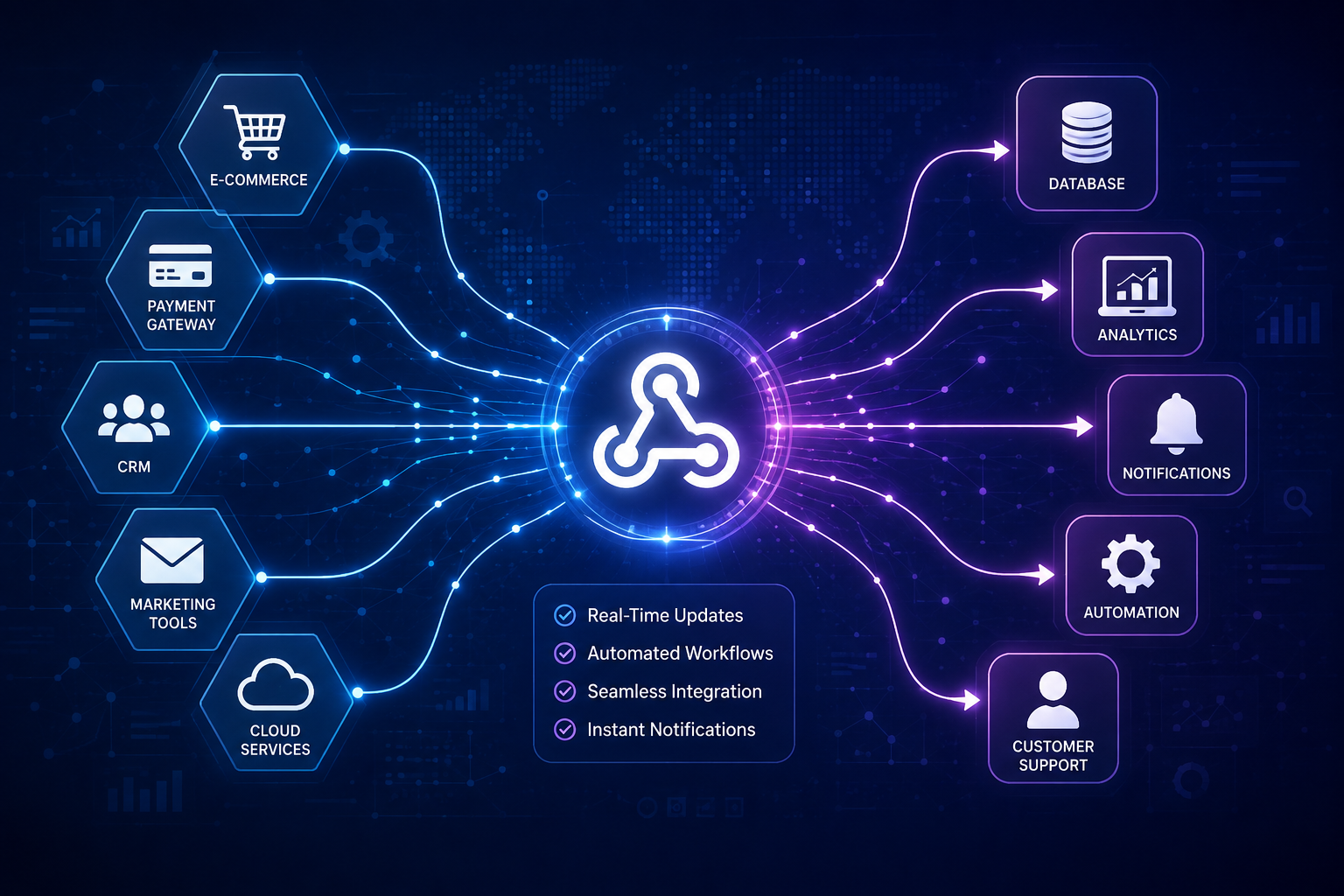
- An e-commerce platform
- A payment gateway
- A CRM
- An email marketing platform
- An accounting system
- A shipping service
- A customer support platform
Webhooks can connect these systems and help keep information synchronized.
For example:
Customer Places Order
↓
E-Commerce Platform
↓
Payment Webhook
↓
Order System Updated
↓
Inventory Updated
↓
Shipping System Notified
↓
Customer Receives Confirmation
This type of event-driven architecture can significantly reduce manual processes.
Webhook Challenges
Although webhooks offer many benefits, they also introduce challenges.
Reliability
Network failures and server downtime can interrupt delivery.
Security
Public webhook endpoints must be protected against unauthorized requests.
Duplicate Events
The same event may sometimes be delivered more than once.
Event Ordering
Events may not always arrive in the exact order they occurred.
Monitoring
Businesses need appropriate logging and monitoring to identify failed or delayed webhook deliveries.
These challenges can be addressed through proper architecture, authentication, retry mechanisms, event IDs, logging, and monitoring.
Best Practices for Webhook Development
Businesses and developers should consider the following practices when implementing webhooks:
- Always use HTTPS.
- Verify webhook signatures.
- Validate incoming payloads.
- Use unique event IDs.
- Implement idempotent event processing.
- Support retries and failure handling.
- Keep webhook endpoints lightweight.
- Log important webhook events.
- Monitor failed deliveries.
- Protect webhook secrets and credentials.
It is also useful to process time-consuming tasks asynchronously rather than making the webhook request wait for every operation to finish.
The Future of Event-Driven Business Systems
As businesses adopt cloud applications, automation platforms, AI services, and interconnected SaaS tools, real-time communication is becoming increasingly important.
Webhooks provide a relatively simple way to build event-driven integrations without requiring every application to constantly poll another system.
They can serve as an important building block for automated workflows, microservices, payment processing, e-commerce platforms, and business integrations.
Conclusion
Webhooks have become an important technology for connecting modern business systems. By allowing applications to automatically send notifications when events occur, they enable faster communication, reduce unnecessary API polling, and support automated workflows.
From payment confirmations and e-commerce orders to CRM updates and marketing automation, webhooks can help businesses connect their digital systems more efficiently.
For organizations building modern applications, understanding webhooks, event-driven communication, security, retries, and idempotency is essential for creating reliable and scalable integrations.