Table of Contents
- ow Audit Trails Improve Accountability in Business Applications
- What Is an Audit Trail?
- Why Are Audit Trails Important?
- 1. Improves Employee Accountability
- 2. Tracks Changes to Important Information
- 3. Helps Detect Unauthorized Activities
- 4. Supports Better Security
- 5. Simplifies Error Investigation
- 6. Helps Prevent Fraud
- 7. Supports Compliance and Auditing
- 8. Improves Financial Transparency
- 9. Supports Better Management Decisions
- 10. Creates a Reliable Record of Business Activities
- Examples of Audit Trails in Business Applications
- ERP Software
- CRM Software
- Accounting Software
- Inventory Management Systems
- HR Software
- What Should an Audit Trail Record?
- Best Practices for Implementing Audit Trails
- 1. Record Important Activities
- 2. Protect Audit Logs
- 3. Use Accurate Timestamps
- 4. Make Logs Easy to Search
- 5. Define Data Retention Policies
- 6. Monitor Suspicious Activity
- 7. Avoid Collecting Unnecessary Sensitive Data
- Audit Trails and Business Accountability
- Conclusion
ow Audit Trails Improve Accountability in Business Applications
In today's digital business environment, organizations rely on software applications to manage important activities such as sales, finance, inventory, customer information, employee records, and business transactions. With multiple users accessing these systems every day, it is important for businesses to know who performed an action, what was changed, and when the change occurred.
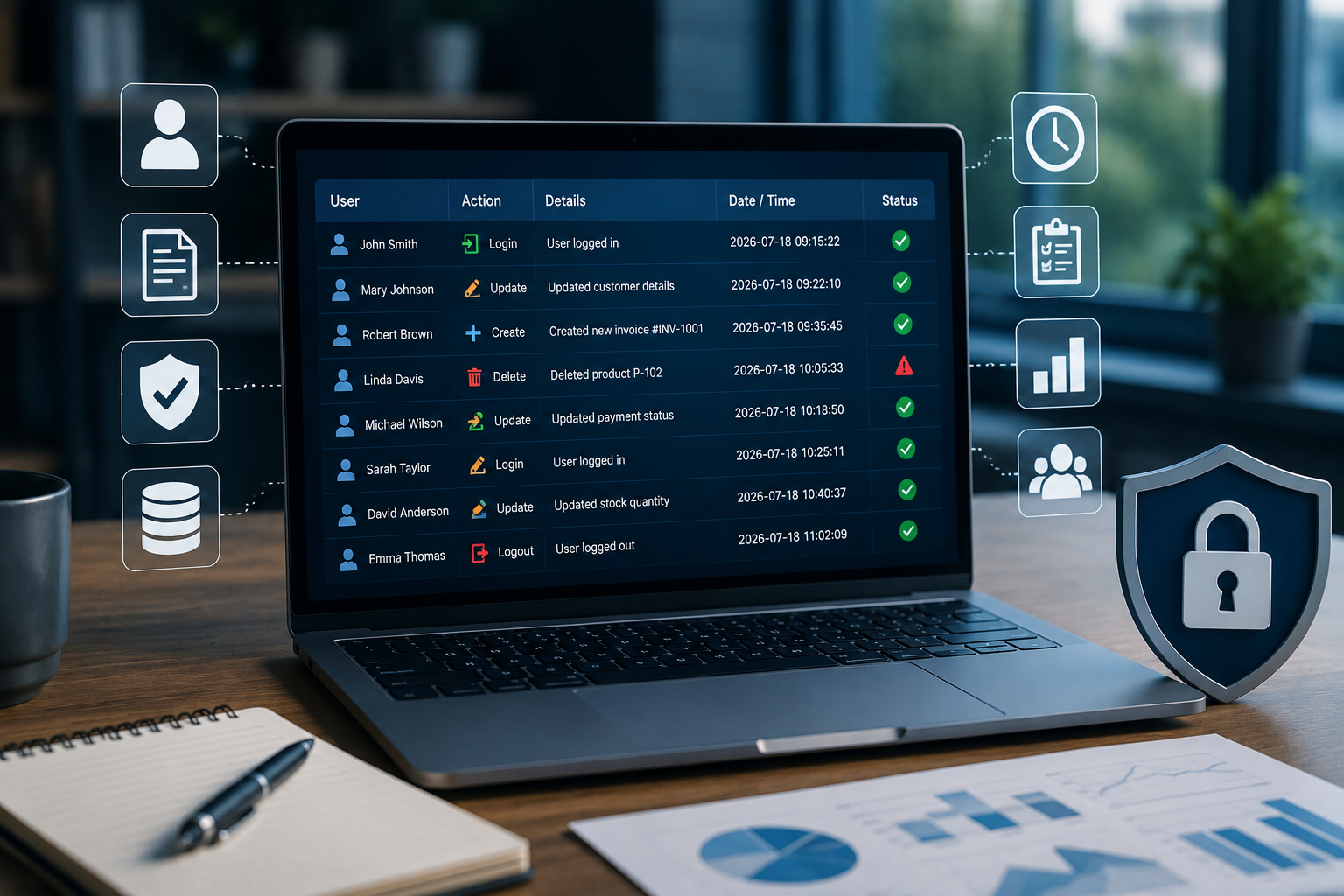
An audit trail helps businesses maintain a detailed record of activities performed within a software application. It improves transparency, supports accountability, strengthens security, and helps organizations investigate problems when they occur.
What Is an Audit Trail?
An audit trail is a chronological record of activities and changes made within a business application or system.
Depending on the application, an audit trail may record information such as:
- User name or user ID
- Date and time of an activity
- Type of action performed
- Previous value
- New value
- Transaction or record ID
- Login and logout activities
- Approvals and rejections
- Deleted or modified records
For example, if an employee changes the price of a product in an inventory system, an audit trail can record who made the change, when it happened, and what the previous and new prices were.
Why Are Audit Trails Important?
Business applications often contain sensitive and valuable information. Without proper activity records, it can be difficult to determine how information was changed or who was responsible for a particular action.
Audit trails provide businesses with greater visibility into system activity and help create a culture of accountability.
1. Improves Employee Accountability
One of the biggest benefits of an audit trail is that it creates responsibility for actions performed within a system.
When users know that important activities are recorded, they are more likely to follow established procedures and handle business information carefully.
For example, if an invoice is modified, the system can record the user who made the change and the time it occurred.
This makes it easier for managers to review activities and address issues when necessary.
2. Tracks Changes to Important Information
Business records can change frequently. Customer details, product prices, inventory quantities, invoices, payments, and employee records may all be updated over time.
An audit trail allows businesses to track these changes.
For example:
Before: Product Price – ₹1,000
After: Product Price – ₹1,200
Changed By: Authorized User
Date: Recorded by the system
This information can be extremely useful when reviewing unexpected changes.
3. Helps Detect Unauthorized Activities
Audit trails can help organizations identify unusual or unauthorized activities.
For example, a business may notice:
- Multiple failed login attempts
- Changes made outside normal working hours
- Unexpected modifications to financial records
- Unusual inventory adjustments
- Attempts to access restricted information
By reviewing system activity, administrators can investigate suspicious behavior and take appropriate action.
4. Supports Better Security
Security is an important part of modern business software. Authentication and access controls determine who can access a system, while audit trails provide visibility into what users do after they gain access.
Together, these controls can provide stronger protection for business applications.
Audit logs can also help security teams investigate incidents and understand what happened during a suspected security event.
5. Simplifies Error Investigation
Mistakes can happen even when employees follow proper procedures.
For example, an inventory quantity may suddenly appear incorrect, or an invoice may contain an unexpected value. Without an audit trail, finding the cause may require significant manual investigation.
With an audit trail, authorized users can review the history of the record and identify relevant changes.
This can significantly reduce investigation time.
6. Helps Prevent Fraud
Financial and operational fraud can have a serious impact on businesses.
Audit trails can provide useful evidence when investigating activities such as:
- Unauthorized invoice changes
- Unusual discounts
- Suspicious payment adjustments
- Inventory manipulation
- Unauthorized customer record changes
- Deletion of important transactions
Audit trails do not prevent every type of fraud by themselves, but they provide visibility that can support fraud detection and investigation.
7. Supports Compliance and Auditing
Many businesses need to maintain records of important activities to meet internal policies, contractual requirements, or applicable laws and regulations.
Audit trails can help organizations demonstrate:
- Who performed an action
- When the action occurred
- What information was changed
- Whether an approval was provided
- How a transaction moved through a workflow
The exact requirements vary by industry and jurisdiction, so businesses should design audit logging according to their specific compliance obligations.
8. Improves Financial Transparency
Financial applications handle sensitive information such as invoices, payments, expenses, taxes, and accounting transactions.
An audit trail can provide a history of changes to financial records and help authorized teams review transactions more effectively.
For example, if an invoice amount is changed after approval, the system can record the modification and provide information that helps auditors understand the transaction history.
9. Supports Better Management Decisions
Audit trails can also provide useful operational insights.
Managers can analyze system activity to understand:
- Which processes experience frequent errors
- Where approvals are delayed
- Which records are frequently modified
- How workflows are being used
- Where additional employee training may be needed
This information can help businesses improve processes and system usability.
10. Creates a Reliable Record of Business Activities
An audit trail creates a historical record that can be reviewed when questions arise.
Instead of relying only on employee memory or manual documentation, businesses can use system-generated records to understand what happened.
This is particularly useful when several employees work with the same records or when transactions pass through multiple departments.
Examples of Audit Trails in Business Applications
Audit trails can be implemented in many types of business software.
ERP Software
ERP systems can track changes to:
- Sales orders
- Purchase orders
- Inventory
- Invoices
- Customer records
- Supplier information
- Financial transactions
CRM Software
CRM applications can record changes to:
- Customer profiles
- Contact information
- Sales opportunities
- Customer communications
- Account ownership
- Deal status
Accounting Software
Accounting applications can track:
- Invoice modifications
- Payment records
- Expense entries
- Journal entries
- Account changes
- Approval activities
Inventory Management Systems
Inventory applications can record:
- Stock adjustments
- Product price changes
- Purchase transactions
- Sales transactions
- Warehouse transfers
- Product information updates
HR Software
HR systems may track changes to:
- Employee records
- Leave requests
- Attendance information
- Salary information
- User permissions
- Approval workflows
What Should an Audit Trail Record?
An effective audit trail should capture the information necessary to understand an activity.
Depending on the application's requirements, useful fields may include:
| Information | Purpose |
|---|---|
| User ID | Identifies who performed the action |
| Timestamp | Shows when the activity occurred |
| Action | Identifies what was done |
| Record ID | Identifies the affected record |
| Previous Value | Shows the original information |
| New Value | Shows the updated information |
| IP or Device Information | May help investigate suspicious activity |
| Reason or Comment | Provides additional context when required |
Not every application needs to record every possible field. Audit logging should be designed around the organization's security, operational, and compliance requirements.
Best Practices for Implementing Audit Trails
1. Record Important Activities
Focus on actions that affect important business information, security, financial records, permissions, and workflows.
2. Protect Audit Logs
Audit records should be protected from unauthorized modification or deletion. Access should be limited to authorized users.
3. Use Accurate Timestamps
Consistent timestamps make it easier to establish the sequence of events during an investigation.
4. Make Logs Easy to Search
Large organizations can generate thousands or millions of log entries. Search, filtering, and reporting tools can make audit trails much more useful.
5. Define Data Retention Policies
Businesses should determine how long audit records need to be retained based on operational requirements, applicable regulations, and organizational policies.
6. Monitor Suspicious Activity
Audit trails become more valuable when organizations actively monitor them for unusual or potentially risky behavior.
7. Avoid Collecting Unnecessary Sensitive Data
Audit logs should contain the information necessary for accountability and investigation without unnecessarily storing sensitive personal information.
Audit Trails and Business Accountability
Accountability is not simply about monitoring employees. It is about creating a transparent environment where important business activities can be reviewed and understood.
When properly implemented, audit trails help organizations answer important questions:
Who made the change?
What was changed?
When did it happen?
Why was it changed?
Was the action authorized?
Having reliable answers to these questions can improve trust and operational transparency.
Conclusion
Audit trails are an important feature of reliable business applications. They help organizations track changes, improve accountability, investigate errors, identify suspicious activity, support security, and maintain greater transparency.
Whether used in ERP, CRM, accounting, inventory, HR, or custom business software, audit trails provide organizations with a valuable historical record of system activity.
As businesses become increasingly dependent on digital systems, maintaining clear and secure activity records is becoming more important. A well-designed audit trail can help businesses protect their information, improve processes, and create a more accountable and trustworthy digital environment.