Table of Contents
- How Software Prototyping Helps Businesses Avoid Costly Development Mistakes
- Introduction
- What Is Software Prototyping?
- Why Prototyping Matters for Businesses
- 1. Helps Identify Requirements Early
- 2. Reduces Miscommunication
- 3. Prevents Expensive Changes Later
- 4. Validates Business Workflows
- 5. Improves User Experience
- 6. Helps Prioritize Features
- Must Have
- Should Have
- Could Have
- Future Features
- 7. Supports Better Budget Planning
- 8. Helps Stakeholders Make Decisions
- 9. Makes User Feedback Easier
- 10. Helps Identify Technical Requirements
- Types of Software Prototypes
- Low-Fidelity Prototype
- High-Fidelity Prototype
- Interactive Prototype
- Example: Prototyping a Billing Application
- Prototyping and Role-Based Access
- Cashier
- Manager
- Administrator
- Prototyping Helps With Mobile and Responsive Design
- Prototyping for API and System Integration
- Common Development Mistakes Prototyping Can Prevent
- Building the Wrong Feature
- Missing Important Workflow Steps
- Poor Navigation
- Unclear Requirements
- Overcomplicated Interfaces
- Incorrect User Permissions
- Underestimating Project Complexity
- Best Practices for Software Prototyping
- 1. Involve Real Users
- 2. Focus on Important Workflows
- 3. Keep Early Prototypes Simple
- 4. Encourage Feedback
- 5. Document Decisions
- 6. Test Before Development
- 7. Connect Prototyping With Requirements
- Prototyping Is Not the Final Product
- How Prototyping Can Reduce Project Risk
- Conclusion
How Software Prototyping Helps Businesses Avoid Costly Development Mistakes
Introduction
Developing business software is a significant investment of time, money, and resources. When an application is built without a clear understanding of what users actually need, even a technically successful project can fail to solve the right business problem.
Changing requirements after development has already progressed can be expensive. A feature may need to be redesigned, databases may need modification, workflows may need to be rebuilt, and development timelines may increase.
Software prototyping provides a practical way to reduce these risks. A prototype gives businesses an early representation of an application so stakeholders can review the proposed workflows, screens, features, and user experience before significant development begins.
By identifying problems early, businesses can make better decisions before those problems become expensive development changes.
What Is Software Prototyping?
A software prototype is an early model or representation of a proposed application.
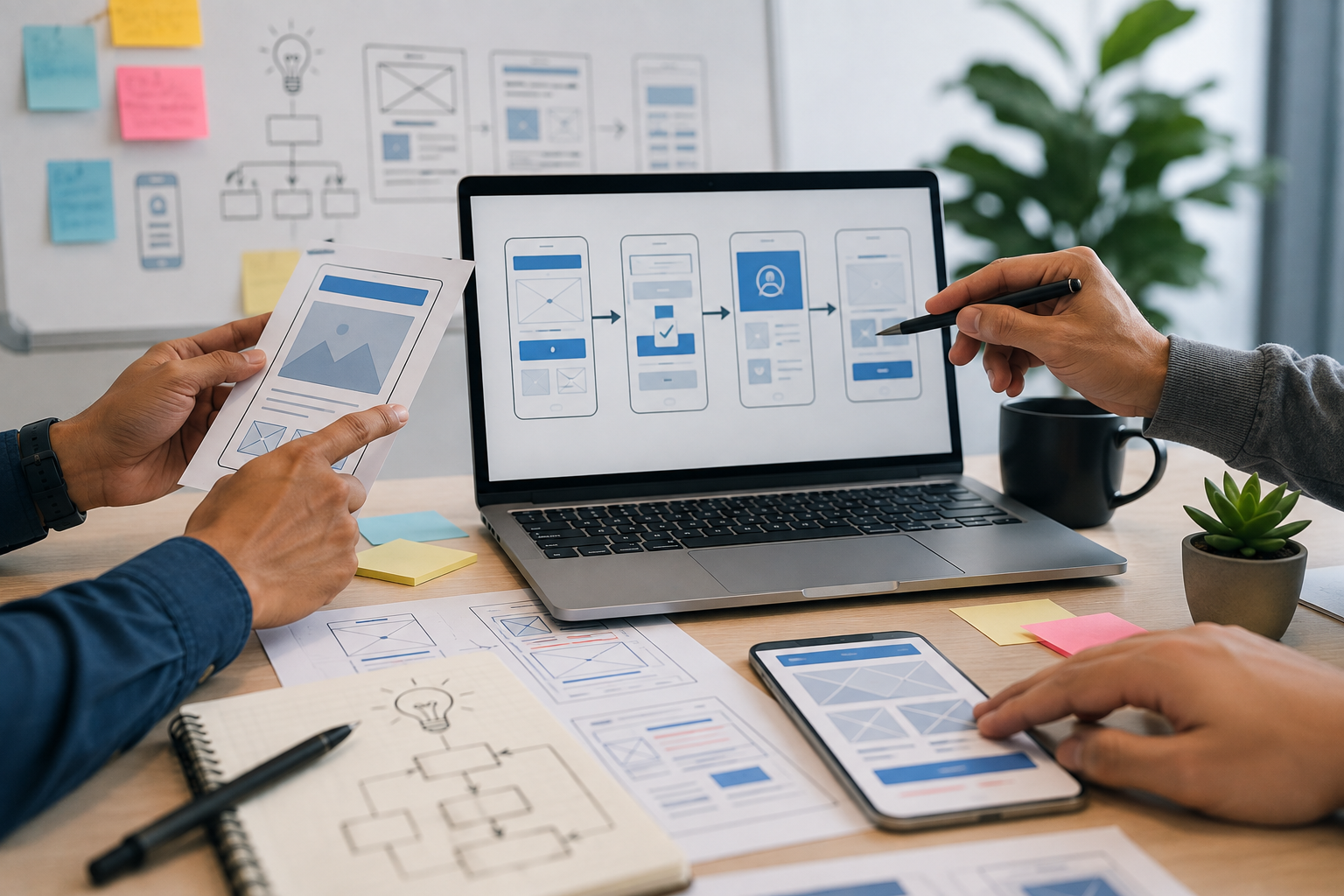
Depending on the project, a prototype can range from a simple sketch to an interactive interface that closely resembles the final application.
A prototype may demonstrate:
- Application screens
- Navigation
- User workflows
- Forms
- Buttons
- Dashboards
- Data presentation
- Approval processes
- Mobile layouts
- Customer interactions
For example, before developing a complete CRM system, a business could create a prototype showing:
Login → Dashboard → Leads → Customer Details → Follow-Up → Sales Report
Stakeholders can review this flow before developers build the complete system.
Why Prototyping Matters for Businesses
Many software problems begin before coding starts.
A business may have an idea of what it wants, but different stakeholders may interpret that idea differently.
For example:
Business Owner: "We need an inventory system."
Manager: "We need stock reports and purchase management."
Warehouse Employee: "I need barcode scanning and stock transfer features."
Developer: "The system needs product, warehouse, stock movement, and user-permission modules."
A prototype brings these perspectives together and creates something concrete that everyone can review.
1. Helps Identify Requirements Early
One of the biggest benefits of prototyping is discovering missing requirements before development progresses too far.
A written requirement might say:
"The system should allow employees to create purchase requests."
A prototype can reveal additional questions:
- Which fields are required?
- Who receives the request?
- Can the employee edit it after submission?
- Who approves it?
- What happens after rejection?
- Does finance need to review it?
- Should notifications be automatic?
- Can the employee track its status?
These questions are much easier to identify when stakeholders can see and interact with a proposed workflow.
2. Reduces Miscommunication
Software projects involve multiple people, including:
- Business owners
- Managers
- Developers
- Designers
- Project managers
- Employees
- End users
Words alone can sometimes lead to different interpretations.
A prototype provides a visual reference.
Instead of saying:
"We need a simple dashboard."
Stakeholders can review an actual dashboard concept containing:
- Sales summary
- Revenue
- Inventory alerts
- Pending approvals
- Customer activity
- Reports
This makes discussions more specific and reduces misunderstandings.
3. Prevents Expensive Changes Later
Changing a design during the planning stage is usually easier than changing a fully developed application.
For example:
Prototype Stage: Change a form layout.
Development Stage: Modify frontend, backend logic, database structure, validation, and testing.
The earlier a problem is identified, the easier it is generally to correct.
Prototyping therefore acts as an early checkpoint before significant development resources are committed.
4. Validates Business Workflows
Business software should reflect how the organization actually operates.
A prototype can simulate workflows such as:
Customer Inquiry → Sales Follow-Up → Quotation → Approval → Order → Invoice
Stakeholders can review whether the sequence accurately represents their business process.
If a step is missing, it can be identified before development.
5. Improves User Experience
A technically functional application can still be difficult to use.
Prototypes allow businesses to evaluate the user experience before the final application is built.
Users can review:
- Navigation
- Form structure
- Button placement
- Information hierarchy
- Dashboard layout
- Search functionality
- Mobile usability
This can help identify confusing interfaces early.
6. Helps Prioritize Features
Businesses often have long lists of desired features.
However, not every feature needs to be included in the first version.
Prototyping discussions can help categorize features into:
Must Have
Essential features required for the application to operate.
Should Have
Important features that provide additional value.
Could Have
Useful features that can potentially be added later.
Future Features
Ideas that can be considered in later versions.
This approach can help businesses focus development resources on the most important functionality.
7. Supports Better Budget Planning
Software costs depend partly on functionality and complexity.
A prototype can reveal how many screens, workflows, integrations, and user roles may be required.
For example, an initial idea may appear to require:
5 Screens
After prototyping, the project may actually require:
20 Screens + 4 Approval Workflows + 3 Integrations + Multiple User Roles
Identifying this complexity early can improve project estimation and reduce unexpected costs.
8. Helps Stakeholders Make Decisions
Business stakeholders may find it difficult to evaluate technical descriptions.
A prototype gives them something visual to review.
They can ask:
- Is this dashboard useful?
- Should this field be required?
- Should managers see this information?
- Is this approval process correct?
- Is the navigation intuitive?
These decisions can be made before development becomes expensive to change.
9. Makes User Feedback Easier
Early user feedback is one of the most valuable aspects of prototyping.
For example, employees may discover that:
- A frequently used feature is difficult to access.
- A form contains unnecessary fields.
- A report needs additional information.
- A workflow contains too many steps.
- A mobile screen needs a different layout.
These observations can be incorporated into the design before the final application is built.
10. Helps Identify Technical Requirements
Prototyping is primarily associated with design and user experience, but it can also expose technical requirements.
For example, a prototype may reveal the need for:
- Real-time notifications
- Barcode scanning
- Payment integration
- API integration
- Role-based permissions
- File uploads
- Reporting
- Search and filtering
- Mobile responsiveness
These requirements can then be considered during technical planning.
Types of Software Prototypes
Different projects require different levels of prototyping.
Low-Fidelity Prototype
A low-fidelity prototype is a basic representation of the application.
It may use:
- Simple sketches
- Wireframes
- Basic layouts
- Placeholder elements
It is useful during early planning.
High-Fidelity Prototype
A high-fidelity prototype looks much closer to the final application.
It may include:
- Realistic designs
- Interactive buttons
- Navigation
- Forms
- Colors
- Icons
- Responsive layouts
This type of prototype is useful for detailed user testing and stakeholder demonstrations.
Interactive Prototype
An interactive prototype allows users to click through screens and experience a proposed workflow.
For example:
Login → Dashboard → Customer → Add Customer → Save → Customer List
This can provide a better understanding of how the finished application may work.
Example: Prototyping a Billing Application
Consider a business planning to build a billing application.
The initial requirement is:
"Create a billing system for employees."
A prototype may reveal the following workflow:
Login
↓
Select Customer
↓
Scan/Search Product
↓
Add Product to Cart
↓
Calculate Tax and Discount
↓
Select Payment Method
↓
Generate Invoice
↓
Print/Share Invoice
↓
Update Inventory
This process may reveal important requirements that were not mentioned in the original idea.
For example:
- Product barcode scanning
- Inventory synchronization
- Discount permissions
- Tax calculations
- Payment options
- Invoice printing
- Customer history
Without prototyping, some of these requirements might only become apparent during development.
Prototyping and Role-Based Access
Different employees may require different interfaces.
For example:
Cashier
- Create bills
- Search products
- Process payments
- Print invoices
Manager
- View sales reports
- Approve discounts
- Manage products
Administrator
- Manage users
- Configure settings
- Manage permissions
A prototype can demonstrate these different experiences before development begins.
This can also help identify whether the application's role-based access model matches business responsibilities.
Prototyping Helps With Mobile and Responsive Design
Businesses increasingly expect applications to work across different devices.
A prototype can show how screens behave on:
- Desktop
- Laptop
- Tablet
- Mobile phone
For example, a large desktop dashboard may need to be simplified for mobile users.
Testing these layouts early can prevent expensive interface redesign later.
Prototyping for API and System Integration
Many business applications need to connect with external systems.
Examples include:
- Payment gateways
- Accounting platforms
- CRM systems
- ERP systems
- Shipping services
- Email platforms
- SMS providers
A prototype can help stakeholders understand where these integrations fit into the user workflow.
For example:
Create Order → Payment Gateway → Payment Confirmation → Order Status Updated
This makes integration requirements easier to discuss before implementation.
Common Development Mistakes Prototyping Can Prevent
Building the Wrong Feature
A business may request a feature that sounds useful but does not solve the actual user problem.
Missing Important Workflow Steps
A process may require approvals, validations, or notifications that were not initially considered.
Poor Navigation
Users may struggle to find important functions.
Unclear Requirements
Different stakeholders may have different expectations.
Overcomplicated Interfaces
Too many fields or options can make software difficult to use.
Incorrect User Permissions
Users may need different levels of access that were not identified early.
Underestimating Project Complexity
The prototype may reveal additional screens, workflows, integrations, and business rules.
Best Practices for Software Prototyping
1. Involve Real Users
Do not rely only on management feedback. Include employees who will actually use the software.
2. Focus on Important Workflows
Prototype the processes that are critical to business operations.
3. Keep Early Prototypes Simple
Do not spend excessive time creating a highly polished prototype before the basic requirements are understood.
4. Encourage Feedback
Stakeholders should be comfortable pointing out problems and requesting changes.
5. Document Decisions
Important changes and decisions should be recorded so that everyone understands the agreed requirements.
6. Test Before Development
Use prototypes to validate assumptions before committing significant development resources.
7. Connect Prototyping With Requirements
The final prototype should help translate business requirements into practical software specifications.
Prototyping Is Not the Final Product
A prototype should not be confused with production-ready software.
A prototype may demonstrate how an application works visually, but it may not include:
- Complete backend functionality
- Production database architecture
- Full security implementation
- Performance optimization
- Complete error handling
- Production integrations
Its primary purpose is to validate ideas and reduce uncertainty before full development.
How Prototyping Can Reduce Project Risk
A software project can be viewed as a series of decisions:
Business Idea → Requirements → Prototype → Feedback → Development → Testing → Launch
If an incorrect assumption is discovered during the prototype stage, it can be corrected before development.
If the same assumption is discovered after launch, the business may face:
- Development costs
- Delays
- User dissatisfaction
- Data migration challenges
- Operational disruption
This is why early validation is so valuable.
Conclusion
Software prototyping gives businesses an opportunity to see, test, and improve an application idea before investing heavily in development.
It can help identify unclear requirements, validate business workflows, improve user experience, prioritize features, uncover technical requirements, and reduce expensive changes later in the development lifecycle.
For businesses planning custom software, prototyping should be treated as an important planning and validation step rather than an optional design exercise.
A well-designed prototype does not guarantee a successful software project, but it can significantly reduce uncertainty and help ensure that the development team is building the right solution for the right business problem.