Table of Contents
- Why Data Validation Is Essential for Reliable Business Applications
- Introduction
- What Is Data Validation?
- Why Data Validation Matters in Business Software
- 1. Prevents Incorrect Data Entry
- 2. Improves Data Quality
- 3. Protects Business Processes
- 4. Reduces Financial Errors
- 5. Improves Inventory Accuracy
- 6. Supports Better Reporting
- 7. Improves Customer Experience
- 8. Prevents Incomplete Records
- 9. Helps Maintain Database Integrity
- 10. Supports Business Rules
- Sales Application
- Inventory System
- HR Application
- Billing System
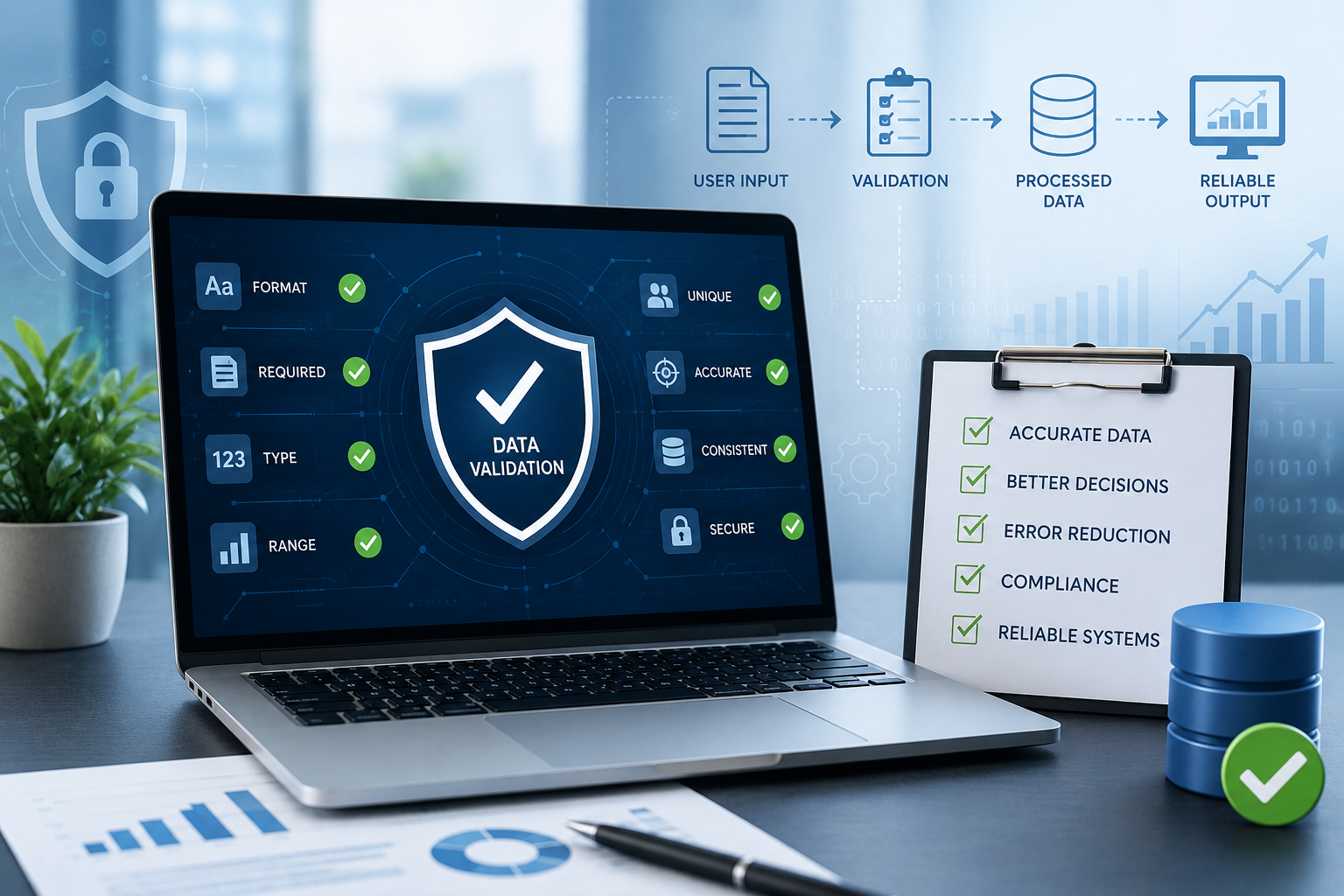
- Types of Data Validation
- Required Field Validation
- Data Type Validation
- Format Validation
- Range Validation
- Length Validation
- Uniqueness Validation
- Relationship Validation
- Business Rule Validation
- Client-Side and Server-Side Validation
- Client-Side Validation
- Server-Side Validation
- Database-Level Protection
- Example: Data Validation in a Billing Application
- Data Validation in Inventory Management
- Data Validation in CRM Systems
- Data Validation in Employee Management Systems
- Data Validation and API Integration
- Common Data Validation Mistakes
- Relying Only on Frontend Validation
- Creating Unclear Error Messages
- Overly Strict Validation
- Ignoring Existing Data
- Not Updating Validation Rules
- Best Practices for Reliable Data Validation
- 1. Define Validation Rules During Requirements Gathering
- 2. Validate at Multiple Layers
- 3. Keep Rules Consistent
- 4. Provide Clear Feedback
- 5. Validate Before Processing
- 6. Protect Critical Business Rules
- 7. Test Edge Cases
- Data Validation and Automation
- How Data Validation Supports Business Growth
- Conclusion
Why Data Validation Is Essential for Reliable Business Applications
Introduction
Business applications depend on accurate and consistent data. Whether a company is managing customers, inventory, invoices, employees, orders, or financial transactions, incorrect information can quickly create operational problems.
A simple mistake such as entering an incorrect phone number may cause communication issues. A wrong product quantity can affect inventory. An invalid invoice amount can create financial discrepancies. When inaccurate data spreads across multiple systems, correcting the problem can become increasingly difficult.
Data validation helps prevent these problems by checking information before it is accepted, stored, processed, or transferred between systems.
For businesses developing custom software or improving existing applications, data validation should be considered an essential part of application design rather than an optional feature.
What Is Data Validation?
Data validation is the process of checking whether information meets predefined requirements before an application accepts or processes it.
For example, when a user enters an email address, the application can check whether it follows an acceptable email format.
Similarly, a billing application may verify that:
- Product quantity is greater than zero.
- Price is a valid number.
- Customer information is complete.
- Tax values are within expected limits.
- Payment information contains the required fields.
The goal is to prevent invalid, incomplete, inconsistent, or inappropriate information from entering the system.
Why Data Validation Matters in Business Software
Business applications often process information automatically.
A single incorrect value can affect multiple processes.
For example:
Incorrect Product Quantity → Incorrect Invoice → Incorrect Inventory → Incorrect Sales Report
Data validation can help stop the problem closer to its source.
Reliable input data contributes to:
- Better business decisions
- More accurate reports
- Fewer operational errors
- Improved customer experiences
- Better system performance
- Stronger data integrity
- More reliable automation
1. Prevents Incorrect Data Entry
Employees enter information into business applications every day.
Examples include:
- Customer names
- Email addresses
- Phone numbers
- Product quantities
- Prices
- Addresses
- Employee details
- Payment information
Without validation, users may accidentally enter incomplete or incorrect information.
For example, a phone number field can require an appropriate number of digits instead of accepting random characters.
This provides immediate feedback and helps users correct mistakes before submitting the form.
2. Improves Data Quality
Data quality is important when businesses depend on information for daily operations and reporting.
Consider a customer database containing multiple variations of the same information:
- ABC Technologies
- A.B.C. Technologies
- ABC Tech
- Abc Technologies
Poor data consistency can make searching, reporting, and customer management more difficult.
Validation rules can help standardize important fields and reduce inconsistent entries.
3. Protects Business Processes
Many business processes depend on valid information.
Consider an order management system:
Customer → Order → Product → Quantity → Price → Payment → Invoice
If one piece of information is incorrect, later steps may also be affected.
For example, if an order allows a negative quantity, the system could produce incorrect inventory calculations.
Validation can prevent such values from entering the workflow.
4. Reduces Financial Errors
Financial information requires particular attention.
Business applications may process:
- Prices
- Discounts
- Taxes
- Payments
- Refunds
- Expenses
- Invoices
- Purchase orders
Validation can ensure that financial fields meet expected rules.
For example:
- Price cannot be negative.
- Quantity must be greater than zero.
- Discount cannot exceed an approved limit.
- Required payment details must be provided.
- Invoice totals should follow defined calculation rules.
These checks can reduce avoidable financial discrepancies.
5. Improves Inventory Accuracy
Inventory systems depend on accurate quantities and product information.
Imagine an employee accidentally enters:
500 units instead of 50 units
Without appropriate validation or review, the system may record the wrong stock level.
This could affect:
- Reordering
- Sales availability
- Warehouse planning
- Inventory reports
- Purchasing decisions
Validation can include reasonable limits and business rules to identify potentially incorrect entries.
6. Supports Better Reporting
Business reports are only as reliable as the data behind them.
Management may use reports to evaluate:
- Sales
- Revenue
- Inventory
- Expenses
- Customer activity
- Employee performance
- Product performance
If the underlying information contains invalid or inconsistent values, reports may provide misleading results.
Data validation helps maintain cleaner input data, improving the reliability of downstream reporting.
7. Improves Customer Experience
Customers often interact directly with business applications.
Examples include:
- Registration forms
- Checkout pages
- Appointment booking
- Contact forms
- Customer portals
- Online payments
Good validation helps users understand what information is required and whether their input is acceptable.
For example:
Invalid Email Address
Instead of allowing the form to fail later, the application can immediately display:
"Please enter a valid email address."
Clear validation messages make applications easier to use.
8. Prevents Incomplete Records
Some business records require specific information before they can be processed.
For example, creating a customer record may require:
- Customer name
- Phone number
- Email address
- Business name
- Address
Required-field validation ensures that essential information is not accidentally omitted.
9. Helps Maintain Database Integrity
Applications often store information in relational databases.
A poorly designed application may allow invalid relationships or inconsistent records.
For example, an order should generally be associated with a valid customer.
Validation and database constraints can work together to help ensure that:
Order → Valid Customer
and
Order Item → Valid Product
This reduces orphaned or inconsistent records.
10. Supports Business Rules
Data validation is not limited to checking formats.
It can also enforce business rules.
For example:
Sales Application
A discount above a certain percentage may require manager approval.
Inventory System
Stock quantity cannot fall below an allowed value unless a special adjustment is authorized.
HR Application
An employee cannot submit overlapping leave requests.
Billing System
An invoice cannot be finalized without required customer and payment information.
These rules help the application reflect real business processes.
Types of Data Validation
Different types of validation can be used depending on the application.
Required Field Validation
Checks whether important information has been entered.
Example:
Customer Name → Required
Data Type Validation
Checks whether the information has the correct data type.
Example:
Quantity → Number
Format Validation
Checks whether information follows a required structure.
Example:
Email → Valid Email Format
Range Validation
Checks whether a value falls within an acceptable range.
Example:
Discount → 0% to 50%
Length Validation
Checks the number of characters.
Example:
Password → Minimum Required Length
Uniqueness Validation
Checks whether a value already exists.
Example:
Employee ID → Must Be Unique
Relationship Validation
Checks whether a record is associated with a valid related record.
Example:
Order → Must Belong to an Existing Customer
Business Rule Validation
Checks whether information follows specific organizational policies.
Example:
Purchase above a defined amount → Requires Manager Approval
Client-Side and Server-Side Validation
Modern applications often use validation at multiple levels.
Client-Side Validation
Client-side validation occurs in the user's browser or application interface.
It can provide immediate feedback.
For example:
Email: Invalid format
Advantages include:
- Fast feedback
- Better user experience
- Fewer unnecessary requests
- Immediate error messages
However, client-side validation alone is not sufficient for security or data integrity.
Server-Side Validation
Server-side validation happens on the application server before information is accepted or processed.
It is essential because users or applications can potentially bypass client-side checks.
For example:
Browser → Server → Validation → Database
The server should independently verify important information before storing it.
Database-Level Protection
Database constraints provide another layer of protection.
Examples include:
- NOT NULL constraints
- Unique constraints
- Foreign keys
- Check constraints
- Appropriate data types
A reliable system can therefore use multiple layers of validation.
Example: Data Validation in a Billing Application
Consider a billing application used by a retail business.
An employee scans or selects a product.
The application should verify:
- Product exists.
- Product is active.
- Quantity is valid.
- Selling price is valid.
- Discount follows business rules.
- Tax calculation is correct.
- Customer information is valid when required.
- Payment amount is acceptable.
Only after these checks should the invoice be finalized.
This creates a controlled process:
Input → Validation → Business Rules → Calculation → Database → Invoice
Data Validation in Inventory Management
Inventory applications can use validation to control stock-related information.
For example:
Stock Received
- Product must exist.
- Supplier must be valid.
- Quantity must be positive.
- Warehouse must be selected.
- Purchase information must be complete.
Stock Transfer
- Source warehouse must exist.
- Destination warehouse must exist.
- Product must exist.
- Transfer quantity must be available.
- Source and destination warehouses should not be identical.
These checks help prevent common inventory errors.
Data Validation in CRM Systems
Customer relationship management systems can use validation for:
- Customer details
- Contact information
- Lead status
- Sales opportunities
- Follow-up dates
- Assigned employees
For example, when creating a sales lead, the application may require:
Customer Name + Contact Information + Lead Source + Assigned Salesperson
This improves the quality of information available to sales teams.
Data Validation in Employee Management Systems
HR applications may validate:
- Employee IDs
- Joining dates
- Department assignments
- Contact information
- Leave requests
- Attendance records
For example, a leave request may be rejected if:
Start Date > End Date
or if the requested dates overlap with another restricted period according to company rules.
Data Validation and API Integration
Modern business applications frequently exchange data through APIs.
For example:
CRM → API → ERP
or:
Website → API → Billing System
When information enters a system through an API, validation remains important.
The receiving application should verify:
- Required fields
- Data types
- Accepted values
- Authentication
- Business rules
- Relationships
- Data formats
This prevents unreliable data from spreading between connected systems.
Common Data Validation Mistakes
Relying Only on Frontend Validation
Client-side checks improve user experience but should not be the only validation layer.
Creating Unclear Error Messages
Users need to understand what went wrong and how to correct it.
Instead of:
"Invalid Input."
Use:
"Quantity must be greater than 0."
Overly Strict Validation
Validation should prevent incorrect data without making legitimate business activities unnecessarily difficult.
Ignoring Existing Data
When improving an existing application, businesses should also consider whether old records already contain inconsistent information.
Not Updating Validation Rules
Business requirements can change. Validation rules should be reviewed when processes change.
Best Practices for Reliable Data Validation
1. Define Validation Rules During Requirements Gathering
Validation requirements should be identified before development begins.
2. Validate at Multiple Layers
Use appropriate client-side, server-side, and database-level controls.
3. Keep Rules Consistent
The same business rule should not produce different results in different parts of the application.
4. Provide Clear Feedback
Tell users what is wrong and how they can correct it.
5. Validate Before Processing
Important information should be checked before it is used in calculations, workflows, or transactions.
6. Protect Critical Business Rules
Important validation should be enforced on trusted server-side systems rather than relying only on the interface.
7. Test Edge Cases
Developers should test unusual inputs and boundary conditions.
Examples include:
- Zero values
- Negative numbers
- Very large numbers
- Empty fields
- Duplicate records
- Invalid dates
- Unexpected characters
Data Validation and Automation
Automation depends heavily on reliable information.
For example:
Low Stock → Automatic Alert → Purchase Request
If inventory data is incorrect, the automation may produce incorrect results.
Similarly:
Invoice Created → Payment Reminder → Customer Notification
If customer contact information is invalid, the automated process may fail.
Good data validation therefore provides a foundation for reliable automation.
How Data Validation Supports Business Growth
As a business grows, the amount of data it handles increases.
A small company may initially manage information manually. Later, it may introduce:
- CRM
- ERP
- Billing software
- Inventory management
- HR software
- Customer portals
- Mobile applications
- APIs
As more systems become connected, poor data quality can become a larger problem.
Strong validation practices help businesses create more reliable information from the beginning.
Conclusion
Data validation is an essential part of building reliable business applications. It helps ensure that information is accurate, complete, consistent, and suitable for the processes that depend on it.
From customer management and inventory to billing, HR, reporting, and API integrations, validation protects business processes from avoidable data errors.
For companies developing custom software, validation should be considered during the requirements, design, development, testing, and deployment stages.
A reliable application is not simply one that performs tasks correctly. It is an application that can also ensure that the information entering those processes is trustworthy.
By implementing thoughtful validation rules and combining them with strong database design, business logic, security, and user-friendly interfaces, businesses can build software that is more accurate, dependable, maintainable, and ready to support long-term growth.