Table of Contents
- Why Design Systems Matter for Scalable Web Applications
- What Is a Design System?
- Why Scalability Creates UI Challenges
- 1. Design Systems Improve Visual Consistency
- 2. Reusable Components Speed Up Development
- 3. Design Systems Support Multiple Development Teams
- 4. Easier Product Expansion
- 5. Better User Experience
- 6. Design Systems Improve Accessibility
- 7. Easier Maintenance
- 8. Faster Onboarding for New Developers
- 9. Better Collaboration Between Designers and Developers
- 10. Design Tokens Create a Strong Foundation
- Design Systems and Front-End Frameworks
- Design Systems Can Reduce Technical Debt
- Design Systems and Responsive Web Applications
- Design Systems for SaaS Applications
- Design Systems Are Not Just for Large Companies
- Common Design System Mistakes
- Creating Too Many Components
- Poor Documentation
- Ignoring Accessibility
- Failing to Maintain the System
- Treating the Design System as a Separate Project
- How to Build a Design System
- Step 1: Audit the Existing Product
- Step 2: Establish Design Foundations
- Step 3: Build Core Components
- Step 4: Create Documentation
- Step 5: Build a Shared Component Library
- Step 6: Test Components
- Step 7: Introduce Components Gradually
- Step 8: Maintain and Improve
- The Future of Design Systems
- Final Thoughts
Why Design Systems Matter for Scalable Web Applications
As web applications grow, maintaining a consistent and user-friendly interface can become increasingly difficult. A small application may begin with a few buttons, forms, cards, and navigation elements, but as new pages, features, and development teams are added, inconsistencies can quickly appear.
Different developers may create slightly different buttons. Designers may use multiple variations of the same component. Colors, spacing, typography, and interaction patterns may gradually become inconsistent.
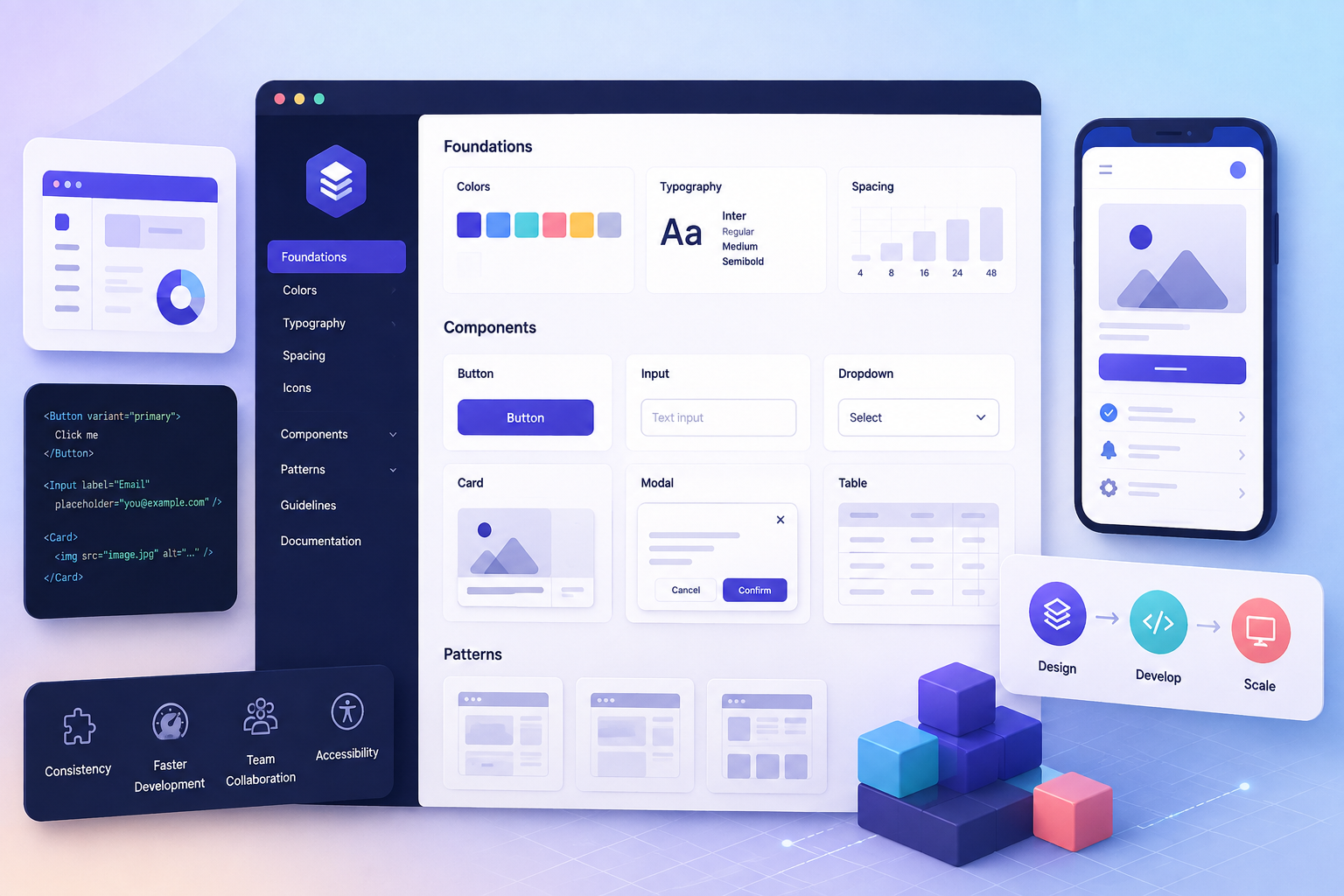
A design system helps solve this problem by providing a structured collection of reusable interface components, design guidelines, patterns, and standards that teams can use when building digital products.
For modern businesses developing scalable web applications, a well-maintained design system can improve consistency, development efficiency, collaboration, accessibility, and long-term maintainability.
What Is a Design System?
A design system is more than a collection of colors and buttons.
It is a shared framework that can include:
- Design principles
- Typography
- Color guidelines
- Spacing rules
- Icons
- UI components
- Layout patterns
- Interaction guidelines
- Accessibility standards
- Documentation
- Development resources
A typical design system might contain reusable components such as:
- Buttons
- Forms
- Dropdowns
- Modals
- Navigation bars
- Cards
- Tables
- Alerts
- Tooltips
- Tabs
- Pagination
- Loading indicators
These components can be reused across different parts of an application.
Why Scalability Creates UI Challenges
Imagine a business starts with a simple web application containing five pages.
As the business grows, the application expands to:
- 50+ pages
- Multiple dashboards
- Customer portals
- Admin panels
- Mobile interfaces
- Different user roles
- Multiple development teams
Without shared standards, the interface can become inconsistent.
For example, one team may create a blue primary button while another uses a slightly different shade. One form may have 8px spacing while another uses 12px. Different pages may use different heading sizes.
Individually, these differences may appear small. Collectively, they can make the application feel unorganized.
A design system provides a common foundation that helps teams avoid these problems.
1. Design Systems Improve Visual Consistency
Consistency is one of the most obvious benefits of a design system.
When reusable components follow established rules, users can interact with different parts of an application without constantly learning new interface patterns.
For example, if every primary action uses the same button style and interaction behavior, users can quickly recognize important actions throughout the application.
Consistency can apply to:
- Colors
- Fonts
- Icons
- Buttons
- Forms
- Navigation
- Spacing
- Error messages
- Page layouts
A consistent interface can make a complex application easier to understand.
2. Reusable Components Speed Up Development
Developers do not need to create every interface element from scratch.
Instead, they can use components that have already been designed, tested, and documented.
For example, rather than building a new form button for every page, developers can use a standard:
PrimaryButton
component with predefined:
- Colors
- Typography
- Padding
- Border radius
- Hover state
- Disabled state
- Loading state
- Accessibility behavior
This reduces repetitive development work.
3. Design Systems Support Multiple Development Teams
Large web applications may have several teams working simultaneously.
Without shared standards, each team may develop its own interpretation of the interface.
A design system creates a common language between:
- UI/UX designers
- Front-end developers
- Back-end developers
- Product managers
- QA teams
- Content teams
Everyone can refer to the same components and guidelines.
For example, instead of saying:
"Create a button that looks like the one on the dashboard."
A team can say:
"Use the primary button component."
This makes communication clearer.
4. Easier Product Expansion
Businesses frequently add new features to their digital products.
A design system makes expansion easier because new pages can be built using existing components.
For example, an existing SaaS platform may already have:
- User profiles
- Data tables
- Search fields
- Filters
- Notifications
- Modal dialogs
When a new reporting module is introduced, developers can reuse these components instead of creating an entirely new visual language.
This helps new functionality feel like a natural part of the existing product.
5. Better User Experience
Users become familiar with interface patterns.
If a confirmation dialog behaves similarly throughout an application, users know what to expect.
Likewise, consistent navigation, forms, buttons, and notifications can reduce confusion.
A design system therefore supports not only visual consistency but also interaction consistency.
For example:
Delete Action → Confirmation Dialog → Success/Error Feedback
Using the same interaction pattern across the application creates predictability.
6. Design Systems Improve Accessibility
Accessibility should be considered from the beginning of product development.
A design system can incorporate accessibility requirements into reusable components.
For example, a standard button component can be designed to support:
- Keyboard navigation
- Appropriate focus states
- Sufficient color contrast
- Screen-reader compatibility
- Clear interaction states
When accessible components are reused throughout an application, teams do not have to independently solve the same accessibility problems on every page.
However, developers still need to test how components are used in real application contexts.
7. Easier Maintenance
Web applications constantly change.
A design system can make large-scale UI updates easier.
Suppose a company wants to update the appearance of all primary buttons.
Without reusable components, developers may need to search through hundreds of pages and update individual styles.
With a centralized component system, the button can potentially be updated in one place and the changes can propagate wherever that component is used.
This can significantly reduce maintenance effort.
8. Faster Onboarding for New Developers
New team members need to understand how an existing application works.
A well-documented design system can make this process easier.
Instead of searching through the entire codebase to discover how components should be designed, developers can refer to documented standards.
Documentation might explain:
- Available components
- Component properties
- Usage examples
- Design rules
- Accessibility requirements
- Do's and don'ts
- Responsive behavior
This creates a useful reference for new team members.
9. Better Collaboration Between Designers and Developers
One common challenge in software development is the gap between design and implementation.
Designers may create a component in a design tool while developers implement something slightly different.
A shared design system can connect these two worlds.
For example:
Design Component → Development Component
A designer creates a standard card component, while developers implement the corresponding reusable code component.
When both follow the same specifications, the final product is more likely to match the intended design.
10. Design Tokens Create a Strong Foundation
Modern design systems often use design tokens.
Design tokens represent reusable design decisions such as:
- Colors
- Font sizes
- Spacing
- Border radius
- Shadows
- Breakpoints
For example:
Primary Color = Brand Blue
Spacing Small = 8px
Spacing Medium = 16px
Border Radius = 8px
Instead of hardcoding values throughout the application, developers can reference shared tokens.
This makes large-scale design changes easier.
For example, if the company changes its primary brand color, the token can be updated rather than manually modifying hundreds of individual components.
Design Systems and Front-End Frameworks
Design systems can work alongside modern front-end technologies such as:
- React
- Vue
- Angular
- Svelte
- Web Components
A business might create a reusable component library such as:
/components
Button
Input
Modal
Card
Table
Dropdown
Alert
These components can then be used across different application modules.
This approach encourages consistency while reducing duplicated code.
Design Systems Can Reduce Technical Debt
Technical debt can accumulate when teams repeatedly create slightly different solutions for the same problem.
For example, an application might eventually contain:
- 12 button variations
- 7 modal styles
- 5 dropdown implementations
- Multiple typography systems
- Several versions of the same form field
Over time, maintaining these variations becomes difficult.
A design system can help consolidate common patterns and reduce unnecessary duplication.
Design Systems and Responsive Web Applications
Modern applications need to work across different screen sizes.
A design system can establish responsive rules for:
- Mobile
- Tablet
- Laptop
- Desktop
- Large screens
For example, a design system can define how a navigation menu changes on smaller screens or how a multi-column dashboard becomes a single-column layout.
This creates more predictable responsive behavior across the application.
Design Systems for SaaS Applications
SaaS products can particularly benefit from design systems because they often contain many complex interfaces.
A SaaS platform might include:
- Dashboard
- User management
- Billing
- Reports
- Settings
- Notifications
- Analytics
- Subscription management
Using reusable components allows these areas to maintain a consistent visual and interaction language.
It can also make it easier to introduce new modules as the product grows.
Design Systems Are Not Just for Large Companies
A common misconception is that design systems are only useful for large organizations.
Smaller businesses can also benefit from establishing reusable components early.
A small application might begin with:
Button → Input → Card → Modal → Table
As the application grows, these components can evolve into a larger system.
Starting with clear standards early can prevent unnecessary inconsistencies later.
Common Design System Mistakes
Creating Too Many Components
Not every small visual difference needs to become a separate component.
Too many variations can make the system difficult to understand.
Poor Documentation
A component library without clear documentation may still lead to inconsistent implementation.
Documentation should explain how and when each component should be used.
Ignoring Accessibility
A visually attractive component is not necessarily accessible.
Accessibility should be included in the component design and development process.
Failing to Maintain the System
A design system should evolve as the product evolves.
Old components should be reviewed, updated, deprecated, or removed when necessary.
Treating the Design System as a Separate Project
A design system should support the actual product.
Designers and developers should work with product teams to ensure that components solve real application needs.
How to Build a Design System
A practical implementation process can include:
Step 1: Audit the Existing Product
Identify repeated UI patterns and inconsistencies.
Step 2: Establish Design Foundations
Define:
- Colors
- Typography
- Spacing
- Grid
- Icons
- Accessibility principles
Step 3: Build Core Components
Start with commonly used elements such as buttons, inputs, cards, navigation, and alerts.
Step 4: Create Documentation
Explain how components should be used.
Step 5: Build a Shared Component Library
Implement reusable components in the application's front-end technology.
Step 6: Test Components
Check usability, accessibility, responsiveness, and browser compatibility.
Step 7: Introduce Components Gradually
Replace inconsistent elements across the application over time.
Step 8: Maintain and Improve
Review component usage and update the system as business and product requirements change.
The Future of Design Systems
As web applications become more complex, design systems are likely to become increasingly important.
Businesses are building products across multiple platforms, teams, and technologies. Shared design foundations can help maintain consistency while allowing teams to work independently.
AI-assisted development may also make reusable component libraries even more valuable. Developers can generate interfaces more quickly, but shared standards are still necessary to ensure that generated interfaces remain consistent, accessible, and aligned with the product's design language.
The future of scalable web development will not simply be about creating interfaces faster. It will also involve creating reusable, maintainable, and consistent digital experiences.
Final Thoughts
Design systems provide a structured foundation for building scalable web applications.
They can help businesses improve visual consistency, accelerate development, support collaboration, strengthen accessibility, simplify maintenance, and make it easier to expand digital products.
A design system is not just a collection of UI components. It is a shared approach to designing and developing digital experiences.
For businesses planning to grow their web applications, investing in a well-organized design system can help create a product that is easier to build, easier to maintain, and easier for users to understand.