Table of Contents
- How Software Scalability Helps Businesses Handle Rapid Growth
- What Is Software Scalability?
- Why Scalability Matters for Growing Businesses
- 1. Supports More Users
- 2. Reduces Performance Problems
- 3. Improves Reliability
- 4. Supports Business Expansion
- 5. Helps Manage Costs
- Types of Software Scaling
- Vertical Scaling
- Horizontal Scaling
- Scalable Architecture and Modular Design
- Database Scalability
- The Role of Load Balancing
- How Cloud Technology Supports Scalability
- Auto Scaling and Changing Demand
- Scalability Is More Than Adding Servers
- Common Scalability Challenges
- Legacy Architecture
- Database Bottlenecks
- Poorly Designed APIs
- Single Points of Failure
- Increased Complexity
- Best Practices for Building Scalable Software
- 1. Plan for Future Growth
- 2. Monitor Application Performance
- 3. Use Modular Architecture
- 4. Optimize the Database
- 5. Consider Horizontal Scaling
- 6. Automate Where Possible
- 7. Test Under Increasing Loads
- When Should a Business Start Planning for Scalability?
- Conclusion
How Software Scalability Helps Businesses Handle Rapid Growth
Business growth is exciting, but rapid growth can create unexpected technology challenges. As more customers visit a website, more employees use an application, and more transactions and data are processed, software that worked well at a smaller scale may begin to slow down or become unreliable.
Software scalability is the ability of an application and its supporting infrastructure to handle increasing workloads while maintaining acceptable performance and reliability. A scalable system can accommodate growth without requiring a complete redesign every time demand increases.
What Is Software Scalability?
Software scalability refers to how effectively a system can handle increasing numbers of:
- Users
- Transactions
- Database records
- API requests
- Website visitors
- Employees
- Uploaded files and documents
- Business processes
For example, an online shopping application may initially serve 1,000 customers per day. As the business grows, it may need to support 50,000 or more customers. A scalable application should be able to handle this increase without major performance problems.
Scalability is different from simply making an application faster. A system may perform well with a small number of users but struggle when the workload increases. A scalable system is designed to maintain acceptable performance as demand grows.
Why Scalability Matters for Growing Businesses
1. Supports More Users
As a business gains customers, its applications need to handle more simultaneous users.
A scalable architecture allows additional computing resources to be introduced when required, helping applications continue serving customers as usage increases.
2. Reduces Performance Problems
Slow applications can negatively affect customer experience. Pages may take longer to load, transactions may fail, and employees may have difficulty completing routine tasks.
Scalability helps businesses prepare their applications for increased workloads instead of waiting until performance problems appear.
3. Improves Reliability
Growth often means that an application becomes more important to daily business operations. If the application becomes unavailable, the business may lose sales, productivity, or customer trust.
Horizontal scaling can distribute workloads across multiple instances, which can improve resilience because the application does not necessarily depend on a single server.
4. Supports Business Expansion
A scalable application can make it easier to introduce:
- New products
- New branches
- Additional employees
- New customer groups
- Additional locations
- New digital services
Instead of rebuilding the entire system, businesses can expand the existing architecture according to their changing requirements.
5. Helps Manage Costs
Scalability does not simply mean continuously adding more servers. Good scalability involves matching resources to actual demand.
Cloud environments can allow businesses to increase or decrease computing resources according to workload, helping reduce unnecessary infrastructure capacity during quieter periods.
Types of Software Scaling
There are two common approaches to scaling applications.
Vertical Scaling
Vertical scaling, also called scaling up, means increasing the resources of an existing server.
For example, a business might upgrade a server by adding:
- More RAM
- More CPU capacity
- Additional storage
- Greater computing power
This approach can be relatively simple and may work well for smaller applications or workloads that are difficult to distribute. However, a single server has physical or service limits.
Horizontal Scaling
Horizontal scaling, also known as scaling out, means adding more servers or application instances and distributing the workload between them.
For example:
1 server → 2 servers → 5 servers → 10 servers
A load balancer can distribute incoming requests across multiple instances.
Horizontal scaling can provide greater capacity and resilience, but the application needs to be designed to work correctly across multiple instances.
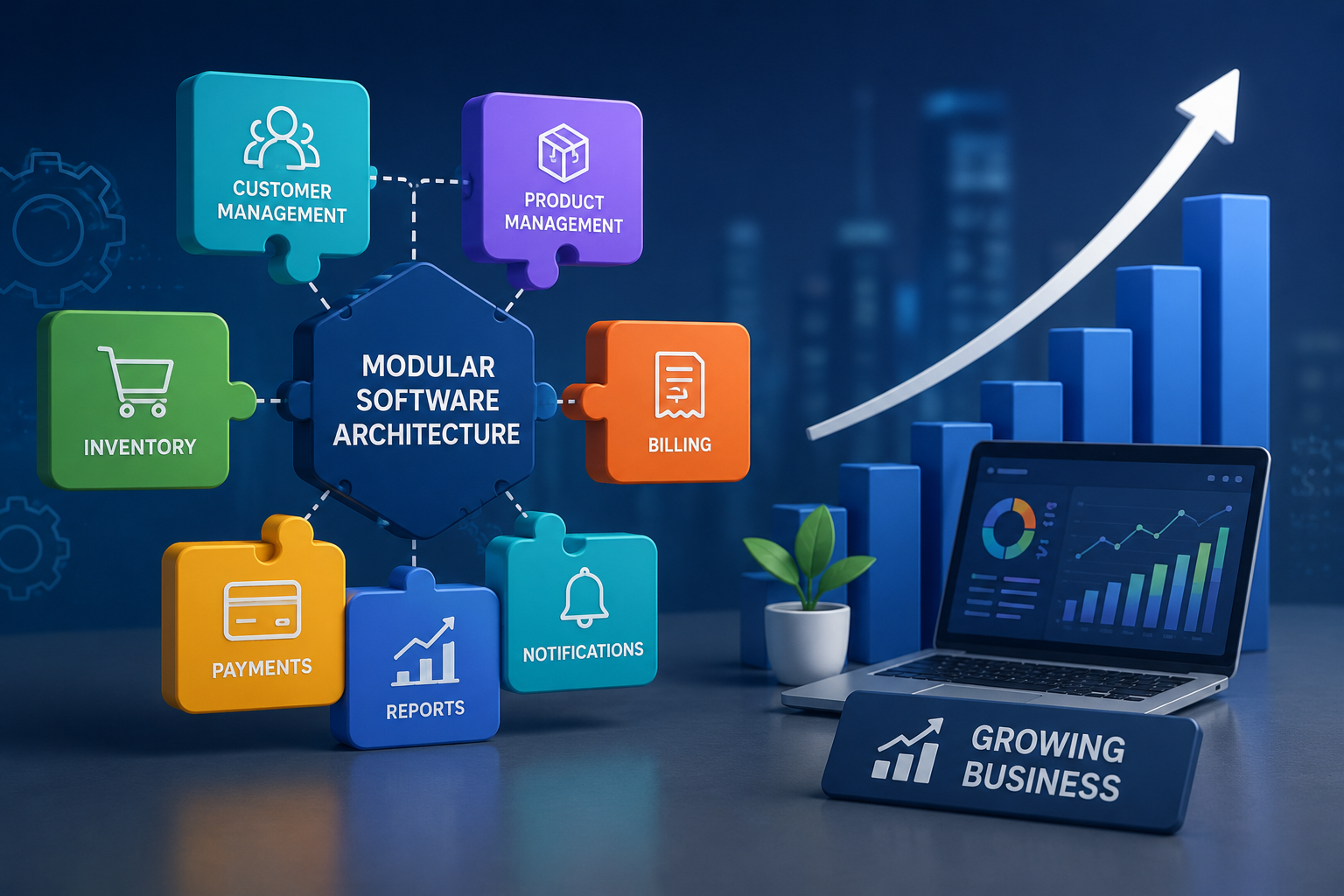
Scalable Architecture and Modular Design
A well-designed application should not necessarily scale every component at the same rate.
For example, an e-commerce application may have separate components for:
- User accounts
- Product catalog
- Shopping cart
- Payments
- Orders
- Notifications
- Reporting
If the order-processing component experiences significantly higher demand, a modular architecture can make it easier to increase capacity for that component without unnecessarily scaling everything else.
Modularity can therefore help businesses manage growing workloads more efficiently.
Database Scalability
As businesses grow, databases can become one of the major performance bottlenecks.
A growing application may need to process millions of:
- Customer records
- Orders
- Payments
- Product records
- Transactions
- Reports
Businesses should consider database optimization, indexing, efficient queries, appropriate storage architecture, and other strategies as data volumes increase.
For very large systems, techniques such as partitioning can help distribute data and workloads more effectively.
The Role of Load Balancing
A load balancer distributes incoming requests among multiple application servers or instances.
For example:
Customers → Load Balancer → Server 1 / Server 2 / Server 3
Instead of sending every request to one server, the workload can be distributed across several resources.
This can help applications handle increased traffic while improving availability and reducing the dependency on a single server.
How Cloud Technology Supports Scalability
Cloud infrastructure provides businesses with flexible computing resources that can be adjusted as demand changes.
For example, a business may need additional capacity during:
- Seasonal sales
- Marketing campaigns
- Product launches
- Holiday periods
- Large events
- Sudden increases in customer activity
Cloud scalability allows resources to be increased when demand rises and reduced when demand falls.
Auto Scaling and Changing Demand
Some applications experience unpredictable traffic. Manually adding resources every time demand increases may not be practical.
Auto scaling can automatically add or remove resources based on predefined conditions or workload patterns. This can help businesses respond to changing demand with less manual intervention.
For example:
Normal traffic → 2 application instances
High traffic → 5 application instances
Traffic decreases → 2 application instances
This approach can help balance performance and infrastructure usage.
Scalability Is More Than Adding Servers
A common misconception is that scalability simply means purchasing more powerful servers.
In reality, scalable software requires consideration across multiple layers, including:
- Application architecture
- Database design
- APIs
- Infrastructure
- Storage
- Networking
- Security
- Monitoring
- Deployment processes
If one component becomes a bottleneck, simply adding resources elsewhere may not solve the problem.
For example, adding more application servers will not necessarily fix an inefficient database query that is slowing down the entire application.
Common Scalability Challenges
Businesses may face several challenges when attempting to scale existing software.
Legacy Architecture
Older applications may have been designed for a small number of users and may not easily support distributed workloads.
Database Bottlenecks
Increasing data volumes can cause slow queries, storage limitations, or increased processing times.
Poorly Designed APIs
Inefficient APIs can consume excessive resources as request volumes increase.
Single Points of Failure
Depending heavily on one server, database, or service can create availability risks.
Increased Complexity
Distributed systems can introduce additional monitoring, networking, deployment, and maintenance requirements. AWS notes that scaling can increase architectural complexity if reliability, security, and manageability are not considered alongside growth.
Best Practices for Building Scalable Software
Businesses planning for growth should consider the following practices:
1. Plan for Future Growth
Don't design an application only around today's number of users. Consider expected growth and potential changes in business requirements.
2. Monitor Application Performance
Track important metrics such as:
- Response time
- CPU usage
- Memory usage
- Database performance
- Error rates
- Traffic volume
- Resource utilization
Monitoring can help identify bottlenecks before they become major problems.
3. Use Modular Architecture
Separate business functions into logical components so individual areas can be improved or scaled when necessary.
4. Optimize the Database
Use efficient queries, appropriate indexes, suitable database structures, and regular performance monitoring.
5. Consider Horizontal Scaling
For applications expected to experience significant or unpredictable growth, horizontal scaling can provide additional capacity and resilience when the architecture supports it.
6. Automate Where Possible
Automation can help with deployments, resource management, monitoring, testing, and scaling operations.
7. Test Under Increasing Loads
Load testing can help businesses understand how an application behaves when the number of users or transactions increases.
Testing before a major product launch or marketing campaign can reveal bottlenecks that might otherwise appear in production.
When Should a Business Start Planning for Scalability?
Businesses should think about scalability before their applications reach their limits.
Warning signs may include:
- Increasing page-load times
- Slow database queries
- Frequent application errors
- Server resource usage consistently reaching high levels
- Increasing API response times
- Customer complaints about application performance
- Difficulties handling traffic spikes
- Frequent server upgrades
Planning early can be less disruptive than trying to redesign an application during a period of rapid growth.
Conclusion
Software scalability is an important consideration for businesses that want to grow without allowing technology limitations to slow them down.
A scalable application can support increasing users, transactions, data, and business operations while maintaining reliable performance. Strategies such as modular architecture, database optimization, load balancing, horizontal or vertical scaling, cloud infrastructure, monitoring, and automation can help create a stronger foundation for future growth.
Businesses should therefore consider scalability during the software-development process rather than treating it as a problem to solve only after the application becomes overloaded.
With the right architecture and continuous performance monitoring, software can grow alongside the business and provide a more reliable foundation for long-term digital expansion.
Meta-friendly takeaway: A scalable software system helps businesses accommodate more users, data, transactions, and traffic without sacrificing performance or requiring a complete application redesign.